Most small businesses that buy an “AI automation” subscription this year will use less than a third of what they’re paying for not because the tool is bad, but because nobody matched it to the right job first. AI automation tools for SMBs now span three genuinely different categories fixed-rule automation, reasoning AI agents, and single-purpose AI apps and vendors blur the lines on purpose. Recent industry reporting on SMB AI adoption trends shows well over half of small businesses now use some form of generative AI, up sharply from just a couple of years ago. The businesses getting real ROI aren’t the ones with the most tools. They’re the ones who picked the right category for each workflow before they signed up.
This guide skips the generic “top 10 tools” format. Instead, it gives you a working decision framework, real implementation steps, and the failure modes nobody puts in the marketing copy.
What Are AI Automation Tools for SMBs?
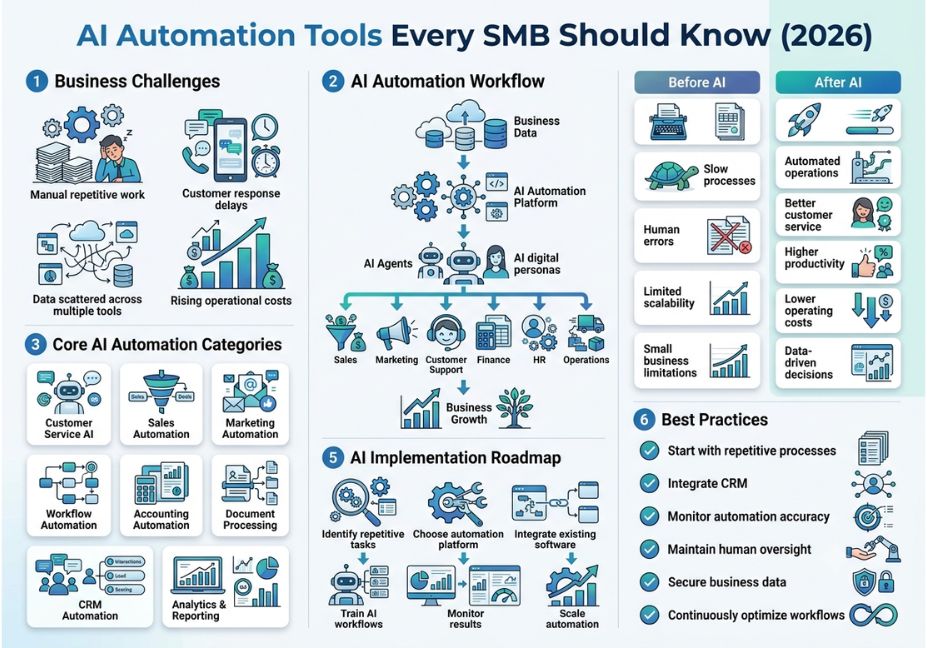
AI automation tools are software systems that use machine learning, natural language processing, or large language models to complete tasks that used to require a person reading, deciding, and acting. That’s a broad definition on purpose, because the category covers everything from a simple trigger-action workflow to a fully autonomous agent.
The useful distinction is how much judgment the system exercises. A tool built on robotic process automation follows a fixed sequence every time same input, same output, no interpretation involved. An AI agent, by contrast, reads context and decides what to do next, which means its behavior can vary run to run. Most tools SMBs buy today sit somewhere on that spectrum rather than at either extreme.
How AI Automation Tools Actually Work
Underneath the marketing language, there are really two mechanisms doing the work.
Trigger-action automation watches for an event a new form submission, an incoming email, a calendar change and fires a predefined sequence of steps. Platforms like Zapier and Make built their entire product around this pattern, and it’s still the backbone of most SMB automation stacks because it’s cheap, fast, and fully predictable.
Agentic automation adds a reasoning loop on top. An LLM is given a goal, a set of tools, and access to your data, then it plans its own sequence of actions checking a customer’s order history, drafting a reply, deciding whether to escalate instead of following a script you wrote in advance. This is essentially the same tool-use loop described in OpenAI’s documentation on how large language models call external tools, just aimed at business operations instead of a chatbot interface.
Technical Note: The “reasoning” in agentic tools is probabilistic, not deterministic. The same input can produce a slightly different output on two different runs. That’s the trade-off for handling exceptions a rule-based system can’t anticipate and it’s exactly why agents need human review checkpoints that fixed automations don’t.
AI Automation vs. AI Agents vs. Off-the-Shelf AI: Which Do You Need?
This is the question competitor articles skip, and it’s the one that actually determines whether a tool earns its subscription fee.
| Question | Points to… |
|---|---|
| Can you draw the workflow as a flowchart with every branch labeled? | Rule-based automation (Zapier, Make, n8n) |
| Does the task involve judgment calls or ambiguous inputs? | An AI agent |
| Is it a standalone task one person does occasionally? | An off-the-shelf AI app (ChatGPT, Claude, Copilot) |
| Does it touch your CRM, inbox, calendar, and billing system together? | An integration-first automation platform |
Pro Tip: Ask any vendor two questions before you buy: “Can you show me a diagram of every step?” and “How does it handle a case outside the expected path?” If the answer to the second is “a fallback rule that escalates to a human,” you’re buying automation don’t pay agent pricing for it.
Paying for agent-level reasoning on a task that’s really rule-based is the single most common overspend SMBs make in 2026. The reverse mistake forcing a rigid automation to handle open-ended customer conversations is the second.
AI Automation Use Cases for SMBs Real Examples
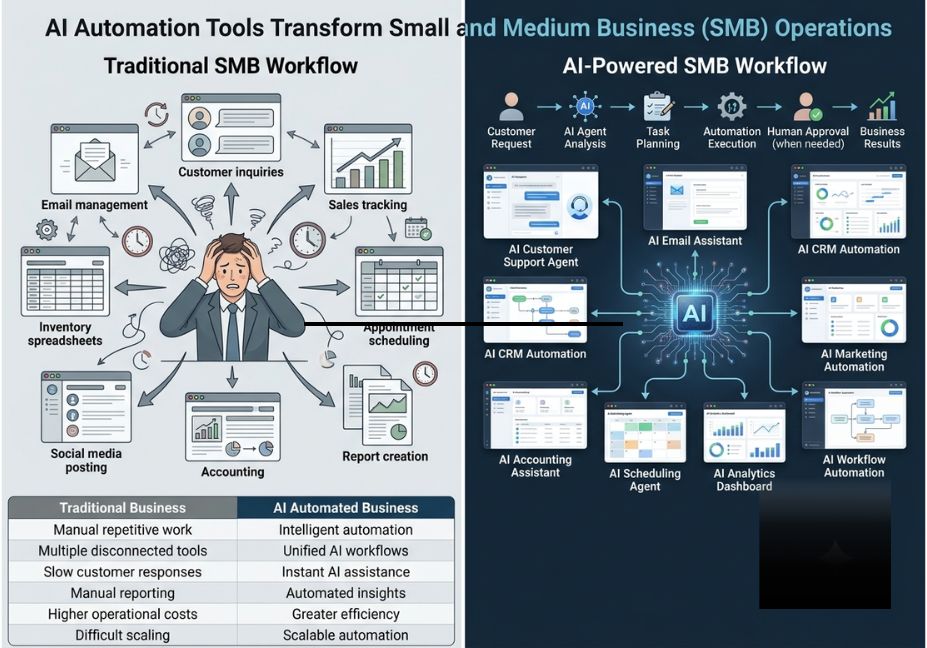
- Customer support deflection: An AI-driven chatbot reads incoming tickets, checks order history, and resolves routine questions without a script for every phrasing.
- Bookkeeping and invoicing: Embedded AI in accounting platforms categorizes expenses, flags anomalies, and reconciles transactions with minimal manual entry.
- Lead follow-up: A workflow watches your CRM for a new lead, an AI step drafts a personalized outreach email, and a scheduling tool books the call automatically.
- Meeting and admin overhead: An AI assistant summarizes calls, drafts follow-up notes, and manages reminders across a small team’s calendar.
- Marketing content at scale: Fixed triggers segment an email list while an AI step writes tailored copy for each segment.
Best Tools and Frameworks for SMBs in 2026
| Tool | Category | Best For | Learning Curve |
|---|---|---|---|
| Zapier | Trigger-action automation | Fastest deployment for simple, cross-app workflows | Low |
| Make | Trigger-action + AI steps | Visual workflow building with moderate AI integration | Medium |
| n8n | Agentic-capable, self-hostable | Technical teams wanting the highest ceiling for custom agent workflows | High |
| HubSpot | Integrated CRM + marketing automation | Sales/marketing teams wanting automation and AI in one platform | Low–Medium |
| ChatGPT Business / Claude for Business | Off-the-shelf AI assistant | Drafting, research, ad-hoc reasoning — not workflow orchestration | Low |
| Microsoft Copilot | Embedded productivity AI | SMBs already standardized on Microsoft 365 | Low |
Did You Know? Structured AI rollouts where a business maps the workflow, defines inputs and outputs, and tests with real data before going live tend to produce several times the return of ad-hoc tool adoption, according to implementation data from automation consultancies working with small teams.
Step-by-Step: How to Implement Your First AI Automation
- Pick one high-friction, high-frequency task. Don’t start with your most complex workflow start with the one your team repeats every single day.
- Map the current process manually, including every decision point a human currently makes.
- Classify each step as fixed-rule or judgment-based using the framework above.
- Build the rule-based parts first in a tool like Zapier or Make the fastest path to a working prototype.
- Layer in an AI step only where judgment is genuinely required, and give it a narrow, well-defined tool set rather than broad system access.
- Add a human-in-the-loop checkpoint for anything customer-facing or financially sensitive before it ships unsupervised.
- Measure the result for two to four weeks before expanding to a second workflow.
python
# Minimal example: an AI step that classifies a support ticket
# before handing it to a fixed-rule routing automation
import requests

def classify_ticket(ticket_text: str) -> str:
    response = requests.post
        "https://api.anthropic.com/v1/messages",
        headers={"content-type": "application/json"},
        json=
            "model": "claude-sonnet-4-6",
            "max_tokens": 50,
            "messages":
                {"role": "user", "content": f"Classify this support ticket as billing, technical, or general: {ticket_text}"}

    return response.json()["content"][0]["text"].strip()
Technical Disclaimer: API endpoints and pricing change frequently. Verify current model names, rate limits, and costs against the provider’s official documentation before deploying to production.
Common Mistakes and How to Avoid Them
- Buying agent-tier tools for rule-based problems. Confirm the actual decision-making requirement before evaluating price.
- Giving an AI agent broad system access “just in case.” Scope tool access tightly — unrestricted CRM and billing access is a data-exposure incident waiting to happen.
- Skipping the human review checkpoint on customer-facing automations. Even strong models make confident, wrong answers occasionally.
- Treating automation as “set and forget.” Rule-based workflows break when a connected app changes its data format; agentic workflows drift as models and prompts evolve — both need monitoring.
- Fragmenting the stack. Ten single-purpose subscriptions are harder to govern than two or three tools that actually integrate with your core systems.
What Business Owners Are Saying
Outside the vendor case studies, the more candid conversations happen in developer and small-business communities including what small business owners are actually running in production, where the recurring theme is that simple, well-scoped automations outperform ambitious agent deployments nobody on the team can maintain.
FAQ
AI automation follows a fixed sequence of steps for every run, while an AI agent is given a goal and a set of tools and decides its own sequence of actions. Automation is predictable and cheap; agents handle ambiguity but cost more and need closer monitoring.
SMBs typically start with customer support deflection, invoicing and bookkeeping, lead follow-up emails, and meeting summarization high-frequency tasks with clear inputs and outputs that free up staff time.
Yes, when matched to the right workflow. The ROI comes from picking one repeated, high-friction task, automating it well, and measuring results not from adopting many tools at once.
Zapier and Make both offer usable free tiers for simple cross-app workflows, and most accounting and email platforms now include AI features in their existing plans, making a dedicated agent platform unnecessary for early-stage automation.
It replaces repetitive, low-judgment tasks rather than entire roles. Most SMBs use automation and agents to handle volume work so staff can focus on relationship-building, exceptions, and strategy.
It depends on the tool’s data handling and how much system access it’s granted. Scoping an AI agent’s permissions tightly and avoiding “shadow AI” tools adopted outside IT oversight are the two biggest safeguards for SMBs.
Conclusion
The SMBs getting real value from AI automation tools in 2026 aren’t the ones with the biggest stack they’re the ones who correctly sorted each workflow into rule-based automation, AI agent, or off-the-shelf tool before they bought anything. Start with one repeated task, match it to the right category using the framework above, and scope any AI agent’s access tightly before it touches customer data. Bookmark this guide and explore more hands-on agentic AI tutorials at agentiveaiagents.com.