

A CPA who spends 45 minutes hunting for a single citation isn’t slow the research stack underneath them is. That’s precisely the gap AI tools for tax professionals are built to close. In fact, by 2026 roughly a third of firms have already put generative AI into their tax research workflow, according to Thomson Reuters Institute survey data. However, most of these tools aren’t simple chatbots. Instead, they’re agentic AI systems that retrieve primary sources, reason over them, draft a response, and cite where every claim came from closer to a research assistant than autocomplete.
That distinction matters, because a general-purpose language model guessing at tax code is a liability, not a shortcut. By contrast, a tool built on retrieval-augmented generation, grounded directly in the Internal Revenue Code, Treasury Regulations, and case law, is something a professional can actually defend to a client or an auditor. So, this guide breaks down how these systems work, where they fit into a real practice, and how to evaluate the best AI tax research software for CPAs and enrolled agents before it ever touches client data.
What Is Agentic AI for Tax Work?
Agentic AI refers to systems that don’t just answer a single prompt instead, they plan a sequence of steps, call tools (search, document parsers, calculators), and revise their approach based on what they find. In tax software specifically, this usually means the system first runs a retrieval step that pulls passages from primary law, editorial analysis, and firm-specific documents before drafting an answer, rather than relying purely on what the underlying model memorized during training.
This architecture is formally known as retrieval-augmented generation (RAG), and as a result, it’s become the backbone of nearly every credible AI tax research tool on the market. For example, platforms like TaxGPT, Blue J, and CCH AnswerConnect all pair a retrieval layer with a reasoning model so answers stay grounded in the Internal Revenue Code and Treasury Regulations rather than in whatever the base model happened to memorize. Similarly, general-purpose assistants such as Thomson Reuters CoCounsel extend this same agent-plus-retrieval pairing into drafting and review workflows. Ultimately, that pairing is what separates a defensible, citation-backed answer from a fluent-sounding guess.
How Do AI Tools for Tax Professionals Actually Work?
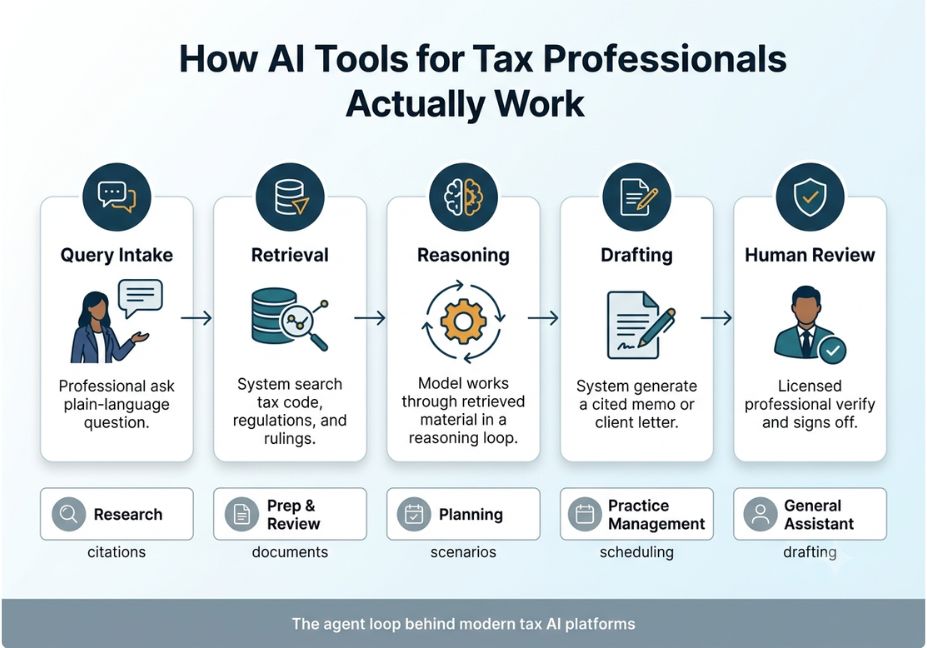
So, how do AI tools for tax professionals actually work, step by step? Most production-grade platforms follow a similar loop:
- Query intake the professional asks a question in plain language instead of Boolean search syntax.
- Retrieval the system searches a vector store of tax code, regulations, and rulings for relevant passages.
- Reasoning the model works through the retrieved material, often in a ReAct-style reasoning-and-acting loop that alternates between “think” and “look something up” steps.
- Drafting the system generates a memo, client letter, or research summary with inline citations.
- Human review a credentialed professional checks the output before it’s used or sent.
Technical Note: Step 5 isn’t optional. Vendors and industry surveys are consistent on this point: current AI tools prepare drafts, extract data, and flag inconsistencies, but a licensed professional still reviews and signs every return.
Pro Tip: When evaluating a tool, ask specifically how it retrieves sources Boolean keyword search, dense vector embeddings, or a hybrid. Tools that show their retrieved passages alongside the answer are far easier to audit than ones that just produce prose.
6 Real-World Use Cases for AI Tools for Tax Professionals
- Tax research asking natural-language questions and getting cited answers pulled from primary sources instead of a 45-minute manual search.
- Return prep and review extracting data from client-submitted PDFs and flagging inconsistencies before a return is filed.
- Client communication drafting engagement letters, IRS notice responses, and plain-language explanations of tax law changes.
- Deduction and credit optimization machine-learning models scanning client financials for missed deductions or credits.
- Audit-risk flagging anomaly detection across transaction data to surface items likely to draw IRS scrutiny before filing.
- Practice management AI-driven scheduling, document chasing, and CRM updates during peak season.
Did You Know? Firms using AI in their tax workflow report saving an average of several hours per professional per week time that shifts toward advisory work and client relationships rather than manual research.
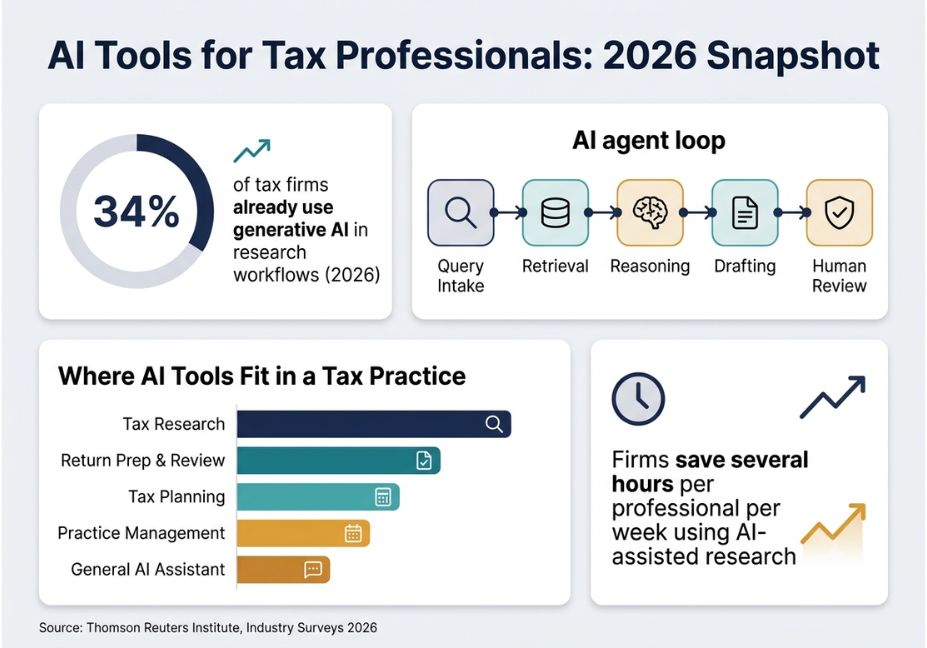
Best AI Tools for Tax Professionals by Category (2026 Comparison)
Not every tool does the same job, so matching the category to the actual bottleneck in your practice matters more than chasing the “best” tool in the abstract. Below is how the leading AI tax research software for CPAs and EAs breaks down by category:
| Category | What It Solves | Representative Tools | Example Approach |
|---|---|---|---|
| Tax research | Citation-backed answers to technical questions | TaxGPT, Blue J, CCH AnswerConnect | RAG over IRC, Treasury Regs, case law |
| Return prep & review | Extracting and reconciling client documents into a draft return | Filed, TaxGPT | Document parsing + anomaly detection |
| Tax planning | Surfacing strategies and projections for advisory work | Blue J, CPA Pilot | Scenario modeling over client financials |
| Practice management | Client coordination, scheduling, document chasing | Karbon, Canopy | Workflow automation + CRM integration |
| General AI assistant | Drafting, summarizing, and connecting into firm software | Thomson Reuters CoCounsel, Claude | Model plus firm-specific connectors |
Architect’s Note: Purpose-built tax platforms cite primary sources directly against the IRC and Treasury Regulations, which is a materially different guarantee than a general-purpose assistant summarizing from memory. Additionally, if multi-state comparison work is central to your practice, look specifically for tools that support side-by-side treatment across all 50 states that’s a feature legacy research platforms like CCH AnswerConnect built out first, and newer entrants are still catching up on.
How to Evaluate and Implement an AI Tool in Your Practice
First, decide what problem you’re actually solving. Then work through this sequence:
- Map the bottleneck. Decide whether the problem is research speed, prep volume, or client coordination the category above should follow from this, not the other way around.
- Ask where client data goes. Request the SOC 2 report, ask whether inputs train shared models, and confirm where data physically resides.
- Check integration fit. A tool that requires switching your core tax software or practice-management platform is a migration project, not an add-on.
- Pilot on low-stakes work first. For instance, run the tool on research or drafting tasks with existing human review before it ever touches a filed return.
- Document your review process. Under Circular 230 obligations, due-diligence and competence duties apply fully to AI-assisted work, so the human sign-off step needs a paper trail. Professional bodies such as the AICPA and NAEA have both published guidance reinforcing this point, and firms that skip documentation are the ones most exposed if a review is ever questioned.
Technical Disclaimer: AI tax platforms update their models and data sources frequently. Feature and pricing details in this article reflect publicly available information as of mid-2026. Always confirm current capabilities directly with the vendor before adopting a tool into a live workflow.
Common Mistakes to Avoid With AI Tax Tools
- Treating AI output as final. Every credible vendor and industry guide agrees on this point: AI hallucination confident but wrong answers remains the single biggest risk, so conclusions always need verification against primary sources.
- Skipping the data-security review. Because client tax data is uniquely sensitive, entering it into a tool without checking retention and training policies is a confidentiality risk, not just a technical one.
- Using a generic assistant for defensible research. In particular, general-purpose chatbots can miss recent law changes entirely a real concern after any major legislative update, such as changes under the One Big Beautiful Bill Act.
- Assuming AI removes the need for review. Ultimately, no tool currently on the market replaces the credentialed professional’s sign-off; instead, it changes what that professional spends their time on.
Where the Conversation Is Heading
Adoption is accelerating fast enough that the debate has shifted from “should we use AI” to “how do we govern it.” The IRS Office of Professional Responsibility issued guidance in 2026 reminding practitioners that existing due-diligence and competence rules apply fully to AI-assisted work a signal that regulators are treating this as a workflow change, not a loophole. For firms, that means the tools worth adopting are the ones built to make review easier, not just output faster.
FAQ People Also Ask
What are the best AI tools for tax professionals?
The best approach combines categories rather than picking one tool: a citation-backed research platform like TaxGPT or Blue J for technical questions, a prep-and-review tool for return workflow, and a general assistant for drafting.
Can AI replace tax professionals?
No. AI can automate research, drafting, and data extraction, but a licensed professional still has to review and sign every return.
Is it safe to use AI tools with client tax data?
It depends on the vendor. Ask for a SOC 2 report and confirm whether your data trains shared models before entering any client information.
How accurate are AI tax research tools?
Tools that cite primary sources directly, such as the IRC and Treasury Regulations, are generally more verifiable than general-purpose chatbots, though hallucination risk still exists in every generative AI tool.
What is agentic AI in tax and accounting?
Agentic AI plans multi-step tasks retrieving sources, reasoning over them, and drafting an output instead of answering from memory alone. It’s the architecture behind most modern AI tax research tools.
Do tax professionals need to disclose AI use to clients?
Disclosure norms vary by firm and jurisdiction, but professional-responsibility guidance, including frameworks referenced by NIST’s AI Risk Management Framework, increasingly expects firms to document their AI review process either way.
Conclusion
AI tools for tax professionals have moved past the novelty stage: the technology behind them retrieval-augmented generation, agentic reasoning loops, and citation grounding is what separates a defensible research answer from a plausible-sounding guess. The practical takeaway is threefold: match the tool category to your actual bottleneck, verify data governance before client information ever touches the system, and keep a documented human-review step no matter how good the draft looks. Bookmark this guide and explore more hands-on breakdowns of agentic AI workflows at agentiveaiagents.com.



