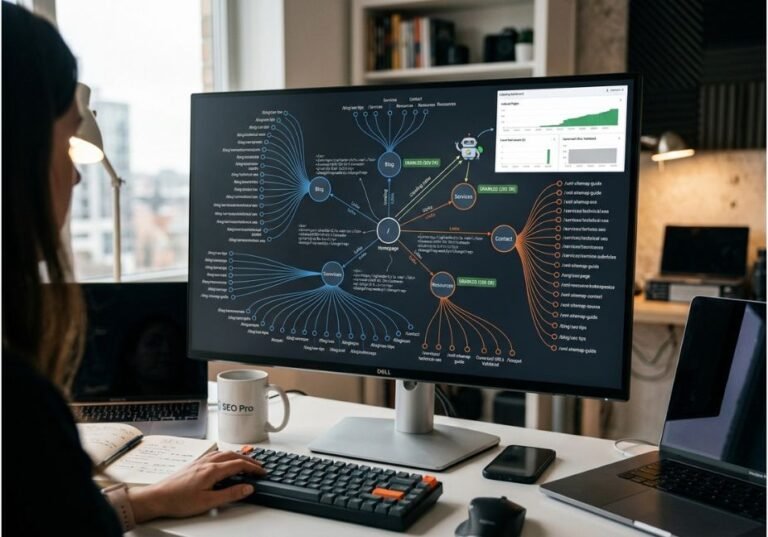
Most teams start tracking AI Overviews the same way they once tracked traditional rankings: manually, by typing queries into Google and eyeballing the results. That approach breaks down quickly, however, because AI Overviews are probabilistic the same prompt can surface your domain in 60% of checks one week and 20% the next, without any change to your content. In other words, a free AI Overviews rank tracking tool exists to replace that guesswork with a repeatable, logged signal, and it’s the fastest way to learn how to track AI Overview rankings for free before you commit budget anywhere. This guide compares the free options actually worth using in 2026, explains the retrieval mechanics behind why their limits exist, and includes a lightweight script for teams that want to supplement a free tier with their own checks.
What Is a Free AI Overviews Rank Tracker?
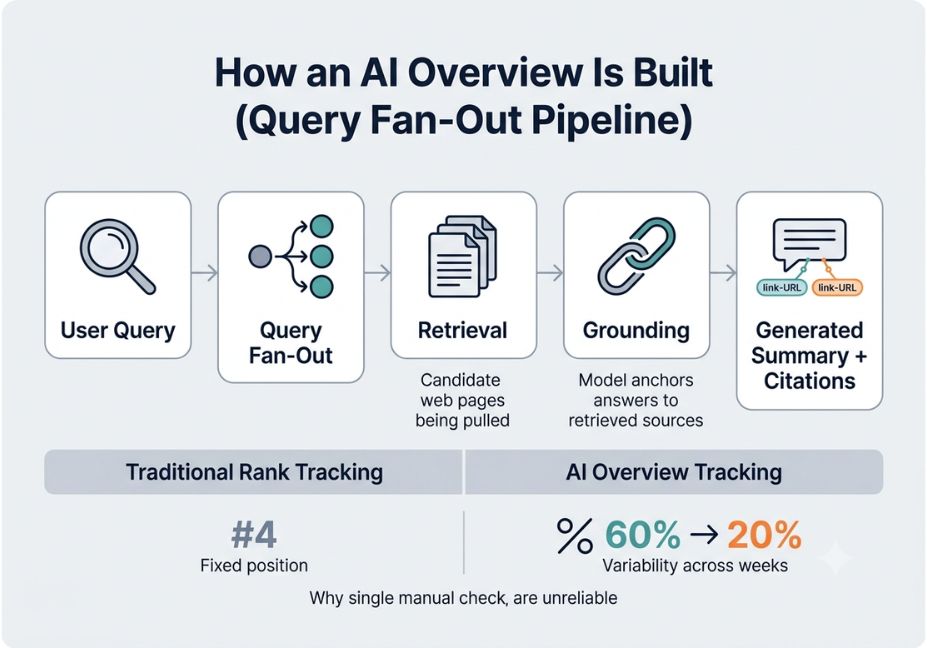
A free AI Overviews rank tracker is a tool that checks whether a domain is cited or mentioned inside Google’s AI-generated answer box, without requiring a paid subscription. Unlike a traditional rank tracker, which returns a deterministic position you’re #4 today, and you’re likely #4 tomorrow an AI Overview tracker instead samples a probabilistic system. As a result, it logs presence, position within the summary, and cited-URL data across repeated checks, since a single check tells you almost nothing about your actual visibility trend.
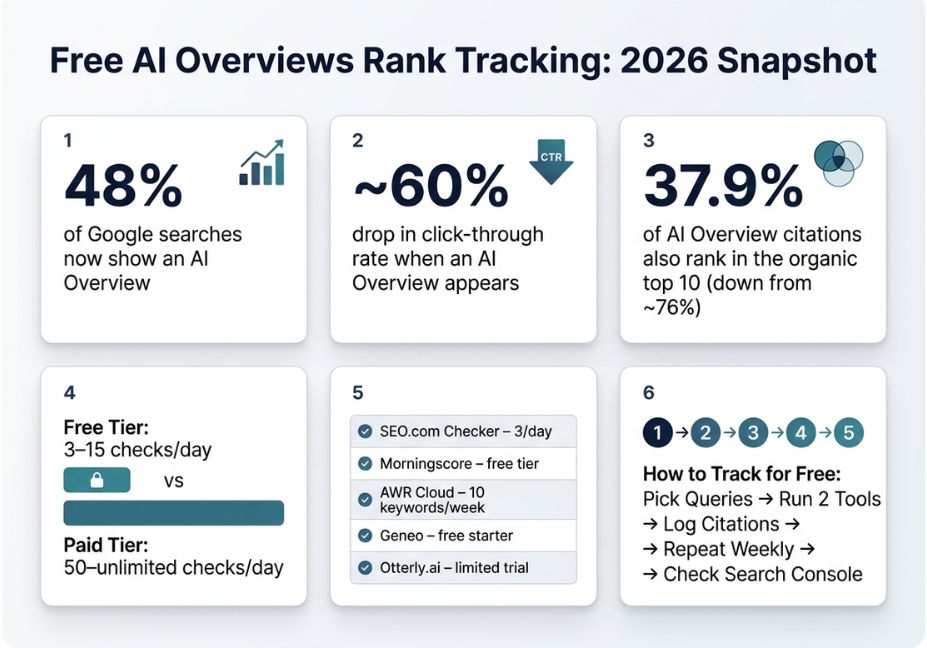
Consequently, free tiers typically cap you at 1–15 checks per day and a small keyword list. That’s still enough, though, to validate whether you have a visibility problem worth solving before you commit budget to a paid platform which is exactly what most small businesses searching for a free AI Overview rank tracker actually need first.
How Does AI Overview Tracking Work?
To understand why free tools are capped the way they are, it first helps to understand what they’re actually measuring against. When a query triggers an AI Overview, Google doesn’t simply summarize a single ranking page. Instead, it runs what Google’s own documentation on AI features describes as a query fan-out: the system issues multiple related sub-queries across subtopics before assembling a response. Specifically, this is the query fan-out technique Google uses to build these summaries, and it closely mirrors the retrieval-plus-generation pattern familiar to anyone who has built with the retrieval-augmented generation architecture this resembles: retrieve candidate documents, ground the model’s output in them, then generate a synthesized answer with citations attached.
Technical Note: This is why AI Overview “rank” isn’t really a rank at all it’s a citation probability across a fan-out of related sub-queries. For this reason, single, one-off manual checks are unreliable for decision-making.
Overall, that architecture explains three things about free tools:
- Why free checks are rationed. Each check may trigger multiple retrieval passes behind the scenes, which therefore costs more per query than a traditional SERP scrape.
- Why results vary run to run. Query fan-out sub-queries and model sampling both introduce variance; consequently, one check is a single sample, not ground truth.
- Why “citation” and “ranking” are different metrics. A page can rank #1 organically and never get cited, or rank #15 and still get pulled into the summary. Free trackers, therefore, report the citation, not the organic position.
Did You Know? One large-scale citation study found that only 37.9% of URLs cited in AI Overviews also ranked in the traditional top 10 down sharply from roughly 76% a year earlier. In other words, organic rank and AI Overview citation are increasingly separate signals, not the same signal measured twice.
Free AI Overviews Rank Tracking Tools 7 Real Options
Here’s what’s actually usable at no cost right now, based on daily check limits and what each tool reports. If you’re wondering how do I know if I’m cited in Google’s AI answers without paying, this table is the fastest way to answer that question yourself.
| Tool | Free tier limit | What it tracks | Best for |
|---|---|---|---|
| SEO.com AI Overview Checker | 3 checks/day, no login | AI Overview presence + cited URLs per domain | One-off spot checks |
| Otterly.ai | Limited free trial checks | Google AI Overviews, ChatGPT, Perplexity mentions | Multi-platform sampling |
| Morningscore | Free entry tier, no credit card | AI Overview presence, cited URLs, trend over time | Teams wanting a dashboard |
| AWR Cloud (AI Overviews module) | Up to ~10 keywords/week | AI Overview appearance flag alongside standard rank tracking | Teams already running AWR |
| Geneo | Free starter tier | AI Overview + ChatGPT + Perplexity competitor comparison | Competitive benchmarking |
| Rankshift | Free tier, flexible limits | Cross-engine AI visibility tracking | Budget-conscious agencies |
| Chrome AIO-detection extensions | Unlimited, manual | Real-time flag of AI Overview presence in live SERPs | Ad-hoc research while browsing |
Pro Tip: Run the same 10–15 keywords through two different free tools for a week before trusting either one. Because of the sampling variance described above, agreement between two independent trackers is a much stronger signal than either tool’s number in isolation.
Best Tools and Frameworks for Scaling Beyond Free Tiers
Free tiers hit a ceiling fast usually around 10–15 tracked keywords and daily, rather than hourly, refresh rates. Once that ceiling becomes the bottleneck, teams typically move to a prompt-based tracking platform, such as Semrush’s AI SEO Toolkit, SE Ranking, or a dedicated GEO tool, that treats each query as a prompt rather than a keyword. This matters because AI Overviews respond to natural-language phrasing, not exact-match strings, so prompt-based monitoring is generally more accurate at scale. Firms like Ahrefs and BrightEdge, for instance, publish ongoing AI Overview coverage data precisely because keyword-based tracking alone no longer captures the full picture.
Comparison of what changes when you move off a free tier:
| Capability | Free tier | Paid tier |
|---|---|---|
| Check frequency | Daily or weekly | Hourly to real-time |
| Keyword/prompt volume | 3–15 | 50–unlimited |
| Cross-engine coverage (ChatGPT, Perplexity, Copilot) | Rare | Standard |
| Historical trend data | Minimal or none | Full history + alerts |
| Competitor citation comparison | Not included | Standard |
Step-by-Step: Setting Up Free AI Overview Tracking
- Pick 10–15 target queries that historically trigger AI Overviews for your niche. Question-style, long-tail, and “best X for Y” queries tend to fan out more reliably than short transactional ones.
- Run each query through two free tools on the same day to establish a baseline citation rate.
- Log presence, position in the summary, and the exact cited URL not just yours, but competitors’ too in a shared spreadsheet or the tool’s dashboard.
- Repeat weekly, not daily, for the first month. Because of the sampling variance in query fan-out, daily noise will otherwise drown out any real signal until you have several weeks of data.
- Cross-reference with Google Search Console impressions for those queries to see whether citation correlates with any impression lift.
For teams comfortable with light scripting, a minimal check loop against a SERP API looks like this:
python
import requests
import csv
from datetime import date

QUERIES = ["best rag pipeline framework", "agentic ai workflow tools"]
DOMAIN = "agentiveaiagents.com"

def check_ai_overview(query, api_key):
    resp = requests.get(
        "https://api.example-serp-provider.com/search",
        params={"q": query, "api_key": api_key}
    )
    data = resp.json()
    ai_block = data.get("ai_overview", {})
    cited_urls = [c.get("url", "") for c in ai_block.get("citations", [])]
    return {
        "query": query,
        "date": str(date.today()),
        "ai_overview_present": bool(ai_block),
        "domain_cited": any(DOMAIN in url for url in cited_urls),
    }

with open("aio_log.csv", "a", newline="") as f:
    writer = csv.DictWriter(f, fieldnames=["query", "date", "ai_overview_present", "domain_cited"])
    for q in QUERIES:
        writer.writerow(check_ai_overview(q, api_key="YOUR_KEY"))
Technical Disclaimer: This snippet assumes a generic SERP API that returns an ai_overview object; exact field names vary by provider. Therefore, confirm the response schema in your provider’s current API docs before relying on this in production, since AI Overview data structures change frequently.
Common Mistakes and How to Avoid Them
- Treating one check as a verdict. A single “not cited” result after one query fan-out sample means almost nothing; track over weeks, not minutes, instead.
- Ignoring competitor citations. A free tracker that only shows your own presence hides the more useful data point namely, who’s being cited instead of you, and why.
- Confusing organic rank with AI Overview citation. As covered above, these are increasingly decoupled metrics, so don’t assume improving one automatically improves the other.
- Never graduating off the free tier. Free tools are a validation step, not a permanent monitoring strategy, once you’re tracking more than a handful of commercially important queries.
What Developers and Marketers Are Saying
Discussion in SEO-focused communities has increasingly centered on whether citation should replace ranking as the primary KPI for informational content, given how sharply click-through rates fall once an AI Overview appears. That shift in framing from “where do I rank” to “am I the source the model chose to cite” is, ultimately, the throughline connecting every tool on this list, free or paid.
Why Track AI Overviews At All?
Because the traffic math has changed. Research tracking search behavior into early 2026 found that AI Overviews now appear on more than 20% of Google searches, and when they do, click-through rates drop by nearly 60%. This is part of independent tracking of AI Overview coverage and click-through impact that shows zero-click search accelerating industry-wide, a trend also documented by the Pew Research Center and BrightEdge. Similarly, if a meaningful share of your target queries now resolve inside the AI Overview box instead of on the page, visibility inside that box is no longer optional to monitor it’s effectively the new impression metric.
Related Reading (Topical Cluster)
This guide sits inside agentiveaiagents.com’s broader coverage of retrieval and agentic search systems. For deeper technical grounding, see our companion guides on RAG pipeline architecture, query fan-out and agentic retrieval loops, and structured data for AI search (schema markup for AEO/GEO) together, these three pieces cover the full stack from how AI Overviews retrieve content to how you get cited in them.
FAQ People Also Ask
What is a free AI Overviews rank tracker?
A free AI Overviews rank tracker checks whether your domain is cited inside Google’s AI-generated answer box, at no cost, usually with a daily limit on how many queries you can check.
How is AI Overview tracking different from normal rank tracking?
Traditional rank tracking reports a fixed position for a keyword. AI Overview tracking reports citation probability instead, which varies because the system samples sources differently each time.
Can I track AI Overviews for free indefinitely?
Yes, for a small keyword set. Free tiers cap daily checks and tracked queries, but there’s no time limit on using them — only on volume.
What counts as a “citation” in an AI Overview?
A citation is a linked source URL that Google’s system pulled into the generated summary, which is distinct from simply ranking well organically for the same query.
Do free tools track ChatGPT and Perplexity too?
Some do. Otterly.ai and Geneo, for example, sample multiple AI search engines on their free tiers, while others like SEO.com’s checker focus only on Google AI Overviews.
How many keywords can I track for free?
Most free tiers support 3 to 15 checks per day, which usually maps to a handful of tracked queries if you’re checking weekly trends.
How do I know if my site is cited in AI Overviews?
Run your target queries through a free checker like SEO.com’s tool or Otterly.ai and look for your domain in the cited-URL list, then cross-check with Search Console’s AI Overview impression data.
Real Cost Comparison: What “Cheap” Actually Costs
Headline price tells you almost nothing on its own. Two tools can both say “$29/month” and differ by 6x in effective cost once you divide by included prompt volume. Here is how the low end of the market breaks down as of mid-2026:
| Tool tier | Starting price | Included prompt volume | Effective cost per prompt | Engines covered |
|---|---|---|---|---|
| Entry-level (e.g., Otterly AI Lite) | ~$29/mo | ~100/mo | ~$0.29 | Google AI Overviews only |
| Mid-tier multi-model (e.g., Knowatoa, LLM Pulse Starter) | ~$49–59/mo | 40–100/mo | ~$0.50–1.20 | 3–4 engines |
| SEO-suite add-on (e.g., SE Ranking / SE Visible) | ~$79/mo | ~200/mo | ~$0.40 | Google AI Overviews, Gemini, ChatGPT, Perplexity |
| DIY build (SerpApi / OpenAI direct) | Pay-as-you-go | Scales to need | ~$0.01–0.05 | Whatever you code |
The gap between vendor pricing and raw API cost is the vendor’s margin for scheduling, parsing, dashboards and alerting. That is a fair trade if your team has no engineering time, and a poor one if you already run agentic workflows.
Pro tip: Most credit-based pricing charges per prompt run, not per engine. One prompt checked across ChatGPT, Perplexity, AI Overviews and AI Mode can use 3–4 credits in a single pull. Ask which stage the credits meter before you buy.
Build vs. Buy: A Minimal Custom AI Overview Tracker
For teams with engineering time, a lightweight tracker is a retrieval-monitoring script rather than a scraping project. Fire a query, detect the AI Overview container, extract cited URLs, and log a timestamped snapshot. Repeat across a sample window, because one request tells you almost nothing: AI Overviews are not deterministic.
Best fit: a SaaS tracker for under a few hundred keywords, which is cheaper than engineering time. Build your own only when you need archived SERP snapshots, a custom sampling frequency, or a feed into your own data warehouse.
Is there a truly free way to monitor AI Overview rankings?
Not a fully automated one. The closest free option is checking priority queries by hand in an incognito window, which does not scale past a handful of keywords. Google Search Console gives directional signal (impression and CTR shifts on informational queries) but no AI Overview-specific data.
How often should I check my AI Overview rankings?
Daily for volatile, high-value queries, because citations can change between consecutive requests. Weekly is the minimum for lower-priority keyword sets.
Do AI Overviews use RAG or a different architecture?
AI Overviews sit on Google’s search index and use a retrieval-augmented generation approach: they pull relevant passages first, then generate a cited summary.
Conclusion
Free AI Overviews rank tracking tools won’t replace a dedicated GEO platform once you’re managing dozens of commercially important queries. However, they’re the right starting point for validating whether AI Overview citation is actually a problem worth solving for your site. Understanding the query fan-out mechanics behind these tools rather than treating them as a black box is ultimately what separates a useful weekly tracking habit from noisy, one-off checks that lead nowhere. Start with two free tools running the same query set, log citations against competitors for a few weeks, and use that baseline to decide whether a paid platform earns its keep. Bookmark this guide, and explore more hands-on AI agent and RAG tutorials at agentiveaiagents.com.