Locating free AI text-to-video applications in 2026 that do not have a watermark is significantly more challenging than discovering technology that just announces a “free plan.”
The difficulty arises from the fact that “free” entails different meanings. It can refer to temporary credits, low-resolution previews, limited trial use, or some restrictions on the usage of the technology. The comparison websites cannot agree on what tools actually give unmarked completed videos. For instance, while the current $0 monthly plan from Pika mentions monthly credits and an option for downloading the video without a watermark, some other apps have various restrictions on their free plans.
Additionally, there is a technical difference that must be made explicitly clear. A true text-to-video system converts a natural language prompt into a series of frames. Contemporary video diffusion systems must keep the spatial quality and the temporal coherence of the video which complicates the model and requires significantly more computational power compared to image generation. Studies identify the issues of temporal coherence, alignment, and efficiency as the challenges ahead.
What Is Free AI Text-to-Video Generation?
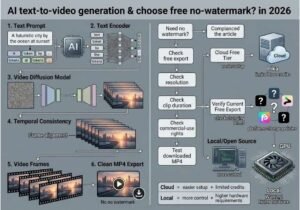
The artificial intelligence technology that enables video creation using written prompts is referred to as AI text-to-video. Simply put, the process is as follows:
The user inputs their text prompt
The language is converted to meaningful data using a text encoder
The video generation model generates the video content based on its estimations
The temporal feature ensures that all frames are connected and video looks smooth and logical
The decoder converts the generated information to video images
The system assembles the frames into a video
According to the Hugging Face Diffusers documentation, AI text-to-video is the technology that uses text to create short video clips, while the technology developed by modern systems like Wan is based on the utilization of diffusion-transformer architecture.
It is important to differentiate text-to-video, image-to-video, and script-to-video.
Text-to-video: text→ video
Image-to-video: image + text → animated video
Script-to-video: script → scenes, stock images, narrations, edits
Video processing: ready video materials → edited video
The lists of “free AI video generators” confuse the above-mentioned concepts.
How We Evaluated Free AI Text-to-Video Tools
A useful comparison needs more than a “free” label.
We evaluated tools around six practical criteria:
| Criterion | What to check |
|---|---|
| Text-to-video | Can a written prompt directly generate video? |
| Watermark | Is branding visible on the downloaded file? |
| Free allowance | Daily, monthly, one-time, or account-dependent credits? |
| Resolution | 480p, 720p, 1080p or higher? |
| Clip duration | How long can a free generation be? |
| Usage rights | Personal use only or commercial use permitted? |
The distinction is important because competitors often report conflicting information. Seedance, for example, is described by multiple 2026 comparison articles as offering watermark-free free output, while other platforms explicitly place watermarks on free generations.
Technical Note: Free-tier policies change much faster than model architectures. Treat credit counts and export restrictions as time-sensitive metadata rather than permanent product specifications.
7 Free AI Text-to-Video Tools Worth Considering in 2026
1. Pika: The Best Option for those Seeking No-Watermark Videos without Cost
Pika is one of the leading names when it comes to finding free services for converting texts into videos without watermarks.
Currently, Pika’s Basic package costs $0 and includes 80 video credits every month, access to Pika 2.5, and downloads without watermarks. The catch here, in this case, is related to resolution: Pika allows free use of its text-to-video telephony only in 480p, while higher resolutions require the use of paid credits.
Best suited for:
Social media videos
Innovative experiments
UFVs using prompts
Amateurs trying to convert texts into videos
Prototypes without watermarks
The drawback here is that clean output does not imply unlimited generation or high resolution.
In general, Pika caters to the audience in need of no-watermark videos rather than 1080p resolution.
Pro Tip: Each free generation should be viewed as an experiment: it’s better to improve the prompt rather than spend the credits generating arbitrary videos.
2. Seedance 2.0 – A Great Free Tier Solution for a Clean Output
Seedance is a very predominant name often heard in 2026 no watermark comparisons. Recently done studies by Fello AI and also the Seedance guide highlight the benefits of free services that offer repeated credits and clean MW.
The biggest strength of Seedance is flexibility in models. Unlike competitors that handle each request in one way, in Seedance different generation models are applied due to different visual needs.
Best For:
Movies experiments
Product ideas
Social networks video clips
Short visual prototypes
Users searching for high-quality output
Nevertheless, one important caveat related to SEO/EEAT should be mentioned: free tier regulations can differ from the ones provided by third parties and change constantly.
That is why, when it comes to statements like “Seedance always gives you Y credits”, make sure you verify these claims via your active account and export screen.
From an architect’s perspective, video file ready for production is just one of several factors. It is important to pay attention to resolution level, output limits, usage limitations, copyright issues, and permitido use of the specific generation model to achieve desired results with the video.
3. Wan2.2 — The Ultimate Local/Open Source Route
For those who possess strong technical skills, Wan2.2 redefines the meaning of the term “free.”
Referring to open modeling, if you have the right hardware configuration, you can simply perform this task at home.
The official Wan2.2 repository provides information on its Mixture-of-Experts design and mentions its capability of producing text-to-video content. Furthermore, Hugging Face’s Diffusers report also includes information about Wan 2.2 T2V conversions.
Wan2.2 on GitHub
Pros:
There is no watermark added to the output of the local model
There is no monthly payment
There is complete control of the inference process
Local/private approach has a lot of advantages
The development field is open
Cons:
Substantial GPU requirements
More difficult installation
Slower performance in local mode
Hardware costs
Turning to the documentation for Wan2.2, one should point out that its larger T2V model requires very high GPU capacity, while its 5B hybrid model can work even on less powerful hardware.
4. Dreamina — Great for Reference-Guided Production
Dreamina is another tool that can be seen on the list of 2026 tools. This tool, according to its recent tutorial, provides free usage with a daily credit system alongside text-to-video production, while highlighting the importance of reference creation, workspace usage, and upgrade.
The way it operates is especially valuable in the cases when writing is just part of creative specifications.
For instance, you can have a combination of:
a text input;
an image reference;
a chosen visual style;
an ideal aspect ratio;
other modifications.
This makes it different compared to any basic tool that uses prompt-to-video approach.
Best for: visual ideation, social media content creation, reference-based experiments, and those who need combination of creation and adjustments in one place.
Technical point to consider: Be sure to check what you have received as a result. “Free creation” and “free download without copyright” are two totally different conditions of provision.
5. Kling AI – An Amazing Quality of Generation, But Not a Strict No-Watermark Solution
Kling AI is worth highlighting due to its great text to video features as it appears in various comparisons of AI videos available for free.
But its own current FAQ also states that any generation made in the free version of Kling AI contains a watermark, while premium subscription leads to a watermark-free output.
This means that Kling AI cannot be considered a definite answer to the question “free text to video without a watermark”.
But it still serves as a good solution when your priorities change from:
“No watermark for free”
to:
“Best visual quality that I can get for free”.
It is the best service in terms of realistic motion, character animation, camera work, and experimentation with quality.
6. Luma Dream Machine – Great for Experimentation, Not Ideal for Clean Exports
Luma Dream Machine is one of the top suggestions in 2026 lists for AI-video applications.
Currently, it has a credit-based pricing system, however, you have to carefully read the fine prints regarding its free plan and watermark options to avoid misinterpretation of it as a watermark-clean alternative. 2026 pricing analysis suggests that while free outputs are always limited and carry a watermark, their paying options are free from such limitations.
In this regard, Luma is good for experimentation but less satisfactory for this specific purpose.
Most suitable for:
Cinematic techniques
Camera movements
Visual prototypes
Prompt quality testing
Not suitable for: getting a clean export free from watermark without any fee.
7. Hailuo – High Experimentation Capabilities, but Watermark Disadvantage
MiniMax developed Hailuo which keeps appearing on the 2026 lists of free AI video generators because it provides free access repeatedly along with short-video generation.
However, findings indicate that watermarks are present on the free videos produced.
Key differences of the application:
Criteria Hailuo
Free experimentation ✅
Text-to-video ✅
Short clips ✅
Recurring free access Not confirmed
No watermark ❌ Confirmed for the free plan
Best suited for watermarkless output ❌
So, Hailuo is a free AI video generator, but it can’t be referred to as a watermarkless free generator.
Best Tools Compared: What Should You Actually Choose?
The biggest mistake is ranking tools only by visual quality.
For this keyword, watermark status should be a hard filter.
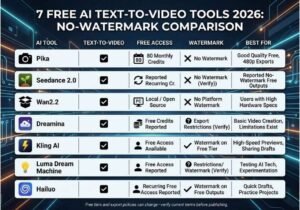
| Tool | Text-to-Video | Free Access | No Watermark | Best Use |
|---|---|---|---|---|
| Pika | ✅ | Monthly credits | ✅ | Short creative clips |
| Seedance | ✅ | Reported recurring credits | Reported ✅ | Higher-quality experiments |
| Wan2.2 | ✅ | Local/open model | ✅ Local | Developers/researchers |
| Dreamina | ✅ | Daily credits reported | Verify current export | Reference-led creation |
| Kling | ✅ | Free access | ❌ Free tier watermark | Realistic motion testing |
| Luma | ✅ | Free access reported | ❌/restricted | Cinematic experiments |
| Hailuo | ✅ | Recurring free access reported | ❌ | Daily experimentation |
Bottom line: If the watermark requirement is non-negotiable, start with Pika, investigate the current Seedance free export, or use a local model such as Wan2.2 if you have the hardware.
How to Get Better Results From Free AI Video Credits
Poor prompt descriptions will eat through credits rapidly.
An effective prompt includes subject + action + setting + camera + lighting + style + duration.
For example:
A small self-operating delivery robot in a contemporary downtown at dawn, real life-like texture of brushed metal with soft reflections and people walking behind, slow cinematic travelling shot with shallow depth of field, natural yellow light at golden hour, accurate movement, aspect ratio 16 to 9, clip length of 5 seconds.
In contrast to:
A robot in the city.
The second prompt gives to the video model lots of restrictions.
The useful structure of a prompt is as follows
[Subject]
+ [Action]
+ [Setting]
+ [Movement of camera]
+ [Lighting]
+ [Visual style]
+ [Technical settings]
This is extremely helpful since contemporary research in the field of text-to-video involves alignment and temporality constantly resisting advances in technology.
Tip: Change only one parameter at a time. In case of simultaneous changes to subject, camera, lighting, style, and length, you will not know which one has led to improvements or degradation.
Common Mistakes When Using Free AI Video Generators
1. Mixing up “free” and “watermarked-free”
A platform can offer infinite creations but still put its watermark on the finished output. It is always wise to check .mp4 files you download, not only those you see in a preview.
2. Overlooking commercial-use limitations
No watermark does not imply unlimited possibility for commercial use. Before publishing your client’s work, ads, or monetization, be sure to check: commercial usage conditions, limitations concerning usage of the image.
3. Comparing different kinds of visual content generation
A script-to-video platform and a diffusion-based text-to-video model address different issues. Avoid comparing a generator of stock-footage with a variant of a generative video model.
4 . Utilizing each available credit for trying out various experiments
Start off with a short test prompt.
As soon as the visual direction is successful, it can be applied to other prompts.
5. Expecting uniformity for longer sequences
Most of the free artificial intelligence video services are more adept in shorter videos than in longer ones
If you need a 60-second long video, it is wise to use the following architecture:
Script → Shots list → Videos → Checking for consistency → Editing → Final export
Technical Workflow: Building a Local Free T2V Pipeline
For programmers looking for an alternative to repeat platform credits, open model provides another direction.
The actual Diffusers documentation produced by Hugging Face provides Wan pipelines for converting text into video.
The workflow is simplified in the following fashion:
import torch
from diffusers import DiffusionPipeline
model_id = “Wan-AI/Wan2.2-T2V-A14B-Diffusers”
pipe = DiffusionPipeline.from_pretrained(
model_id,
torch_dtype=torch.bfloat16
pipe = pipe.to(“cuda”)
prompt = “””
An advanced AI research facility during the night,
with cinematic camera movement, realistic lighting,
detailed scenes and smooth animations.
“””
result = pipe(prompt)
frames = result.frames[0]
The methods used abroad for loading and controlling the memory depend on the issued model of Wan, the GPU, the Diffusers version and the settings used for disparaging. Use the recommended implementation as a reference point and not as an old tutorial.
Technical Disclaimer: Applications and models developed in AI video generation are on changes very often. The example above is created to provide illustration on the architecture and not to guarantee compatibility of all the current versions of released products.
What Competitors Get Wrong About “No Watermark”
The search results indicate that there is a real difficulty concerning content quality.
Some compare tools to be watermark-free when in fact another site states they have a watermark, while others put image-to-video, script-to-video, and real text-to-video systems into the same chart.
This gives us an extra advantage:
Watermark cannot be seen as an export property, it is an indicator of marketing.
Trustworthy testing would comprise:
Making a video from the text
Exporting the final file
Checking every corner of the video
Checking the resolution
Checking if free usage is allowed by the free plan
Taking note of the model and date
Rechecking after major model/price updates
This is especially relevant to AI video because the product policy can change quicker than the search engine ranking.
FAQ: Free AI Text-to-Video Tools 2026
Which is the most reliable free AI text-to-video tool with no watermark for use in 2026?
Pika appears to be among the best options that are verified and safe to use. With its Basic Plan costing $0 per month, it provides 80 video credits, free access to text-to-video videos with 480p quality, and watermark-free downloads. If developers prefer to set up models on their own machines, then Wan2.2 offers them an alternative option to work without copyright watermarks, but it’s more complicated set-up.
Is it possible to create free AI videos without copyright watermarks?
There are options for creating free AI videos without copyright watermarks, but their number is limited, and the restriction varies depending on the tool. Currently, Pika is one of the services that provide the option of watermark-free downloads on its free plan. Moreover, there are several open-source models available for local downloading and thus creating videos without watermarks from the plants, though they require specific hardware and set-up.
Are AI video generation platforms really free of limits?
Generally, they are not. Most of the services include daily, monthly or once-in-a-lifetime credits. Local generation based on open-source software can get rid of subscription credits, while the limit here is determined by your GPU, storage, electricity consumption, and time of the generation.
Which is the best AI tool for video motion generation?
Kling is a great choice when it comes to motion quality but its current free version has a watermark, making it useful only for free tests and experiments, but not suitable in case you want to publish watermark-free videos.
Is it allowed to use AI-generated videos for commercial purposes?
It depends on the model and the plan offered by the service. Free videos do not grant you commercial rights automatically, so you should check out current terms before using-any video for advertising or monetized content.
Conclusion
Searching for free AI text-to-video tools with no watermark in 2026 is not just about getting a list of links.
Here are the three key conclusions to come to:
Pika has one of the most straightforward free text-to-video/no-watermark solutions; however, its resolution capabilities are limited.
There are certain limitations with the cloud-based tools such as free credits, watermarks, resolution, video duration, and commercial rights which need to be taken into consideration.
Using local models, like Wan2.2, can make sense for many tech-savvy customers, as they give the strongest guarantee of avoiding any subscription model in the long run but require good GPU equipment.
To achieve the desired results, it is wise to execute the first part of the workflow, namely to test a short prompt first, take a close look at the file after export, and check the current terms of use.