
Most teams find out they have an AI Mode tracking problem the hard way: a client asks whether they show up when someone asks Google AI Mode about their category, and the honest answer is “we don’t actually know.” Traditional rank trackers were built around a list of ten blue links. AI Mode instead synthesizes an answer from many sources and cites a handful of them, so “position #3” stops being a meaningful concept.
This guide covers the tools that are actually free not 14-day trials repackaged as freebies. Since this site is about agentic workflows, it also shows how to wire a couple of them into a small automation loop so you’re not manually re-running the same check every morning. AI-referred traffic is climbing fast industry-wide, which makes ignoring this space an increasingly expensive habit.
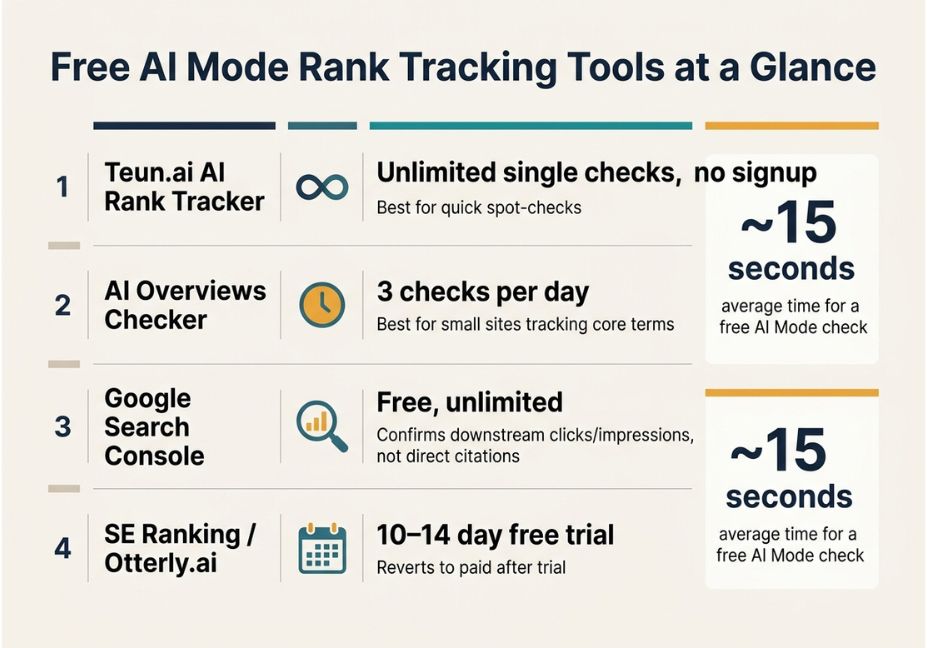
The most genuinely free AI Mode rank tracking tools right now are Teun.ai’s AI Rank Tracker (unlimited single checks), AI Overviews Checker (3 checks/day), and Google Search Console (free, unlimited, but indirect). None offer scheduled historical tracking for free for that, pair one with a small logging script or move to a paid tier.
What Is AI Mode Rank Tracking?
AI Mode rank tracking means monitoring whether and how your brand or URL gets cited inside Google’s AI Mode answers for a set of prompts, instead of tracking a fixed SERP position. In other words, it answers the question “how do I check if I’m mentioned in Google AI Mode for free?” rather than “what position am I ranking at?” AI Mode assembles its response from multiple sources rather than returning a static list of links. As a result, conventional rank-tracking tools simply can’t capture it on their own.
This overlaps heavily with generative engine optimization (GEO), the broader practice of structuring content and managing online presence so it gets surfaced and cited inside AI-generated answers. Some practitioners call the same discipline answer engine optimization (AEO) or AI optimization (AIO), depending on which platform Google AI Mode, ChatGPT, Perplexity, or Gemini they’re focused on. Either way, the underlying goal is the same: earn a citation, not just a click.
How Does AI Mode Tracking Actually Work?
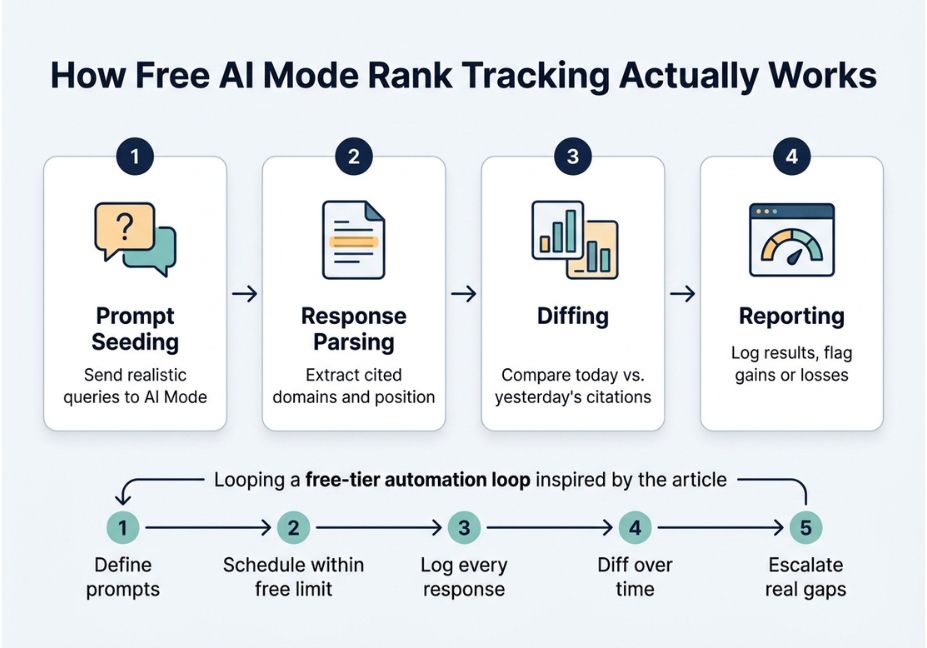
Every AI Mode tracker, free or paid, follows roughly the same mechanism:
- Prompt seeding the tool sends a batch of realistic queries to AI Mode.
- Response parsing it extracts which domains, brands, or URLs got cited, and roughly where in the answer.
- Diffing it compares today’s citations against yesterday’s to flag gains or losses.
- Reporting results roll into a dashboard, CSV export, or alert.
The nuance worth internalizing: the more mature tools report answer share and inclusion rate rather than a ranking position, because AI-generated summaries simply don’t have fixed slots the way a SERP does. That distinction is a useful filter when comparing “free” tools — a checker that only tells you mentioned: yes/no is solving a structurally simpler problem than one that also tracks where in the answer and how consistently over time.
Technical note: Google doesn’t expose an official API for AI Mode citations. Every third-party tool, free or paid, is either automating the interface directly or relying on a partner data feed. Treat “real-time” claims with some skepticism and spot-check manually before trusting a trend line.
Free AI Mode Rank Tracking Tools Worth Using
So, which tools actually let you check AI Mode rankings without paying anything? Here’s what’s genuinely usable at $0 right now:
| Tool | Free Tier | Best For | Catch |
|---|---|---|---|
| Teun.ai AI Rank Tracker | Unlimited single checks, no signup | Quick spot-checks by keyword + location | No built-in historical logging |
| AI Overviews Checker | 3 checks/day | Small sites tracking a handful of core terms | Built for AI Overviews, not AI Mode specifically |
| Google Search Console | Free, unlimited | Confirming whether AI-surfaced traffic reaches your site | Doesn’t show AI Mode citations directly, only downstream clicks/impressions |
| SE Ranking / Otterly.ai trials | 10–14 day trial | Testing enterprise-style dashboards before buying | Reverts to paid after the trial not a lasting free option |
Did you know? At least one free checker returns a result in about 15 seconds per query fast enough for manual spot-checks across a keyword list in one sitting, but not a substitute for scheduled monitoring at scale.
Pro tip: Pair a free single-query checker with Google Search Console’s Performance report filtered by query. If Search Console shows impressions on a question-style query with near-zero clicks, that’s often a sign AI Mode is answering the query directly above your listing.
Free Tools vs. Paid Platforms Where the Line Actually Sits
Free tools are built for occasional spot-checks. Paid platforms exist because agencies and larger sites need three things free tools rarely offer: historical trend lines, multi-brand comparison, and scheduled automation. Some newer entrants have even moved to wallet-based, pay-per-check pricing specifically because freelancers and small teams don’t want a flat monthly fee for checks they run irregularly which is itself a signal that the market treats “free/occasional” and “paid/scheduled” as genuinely different use cases, not a lesser and greater version of the same product.
If your actual need is “check three keywords twice a month,” a free tool is genuinely sufficient. If it’s “track fifty keywords daily across four competitors,” you’ll hit the free-tier wall fast and that gap is what the next section addresses.
Step-by-Step: Automating Free-Tier Checks with a Simple Agent Loop
Free checkers cap you at a handful of queries per day. The fix isn’t paying for an enterprise dashboard it’s a small orchestration script that respects the rate limit and logs results so you build your own history over time.
- Define your prompt set. Write 10–20 realistic, question-style prompts a buyer would actually type not just your keyword list.
- Schedule within the free limit. If a tool allows 3 checks/day, spread your prompt set across a week instead of forcing it through in one run.
- Log every response. Store the raw answer text, cited domains, and timestamp not just a pass/fail flag.
- Diff over time. Compare week-over-week logs to catch citation churn, which tends to track model updates more than seasonal SEO shifts.
- Escalate only real gaps. Alert yourself only when a competitor appears in three or more consecutive checks where you don’t.
This is essentially the same pattern as an agent’s memory and retrieval loop, applied to a tracking problem instead of a chatbot. A minimal version using LangChain for the orchestration layer looks like this:
python
from langchain.agents import initialize_agent, Tool
from langchain_openai import ChatOpenAI
import csv, datetime

def log_check(prompt: str, response_text: str, cited: bool) -> str:
    with open("ai_mode_log.csv", "a", newline="") as f:
        writer = csv.writer(f)
        writer.writerow([datetime.datetime.now().isoformat(), prompt, cited, response_text[:200]])
    return "logged"

tools =
    Tool
        name="log_ai_mode_result",
        func=log_check,
        description="Logs an AI Mode check result with timestamp, prompt, and citation status."


llm = ChatOpenAI(model="gpt-4o-mini", temperature=0)
agent = initialize_agent(tools, llm, agent="zero-shot-react-description")

# Run this once per allotted free-tier check, not in a tight loop
agent.run("Check whether 'agentiveaiagents.com' is cited for the prompt: "
          "'best free tools to track AI Mode rankings'. Then log the result.")
Read this as a template, not a scraper: swap the manual check-and-log step for whichever free tool’s own interface or API you’re using, and stay well within its published rate limits. This borrows the agent-loop pattern documented in LangChain’s own a simple agent loop guide.
Technical disclaimer: Framework versions evolve rapidly. The snippet above targets LangChain’s current agent API as of mid-2026; check the official docs before running it in production, and always respect a tool’s terms of service and rate limits rather than working around them.
Common Mistakes and How to Avoid Them
- Treating “mentioned” as binary. Being cited once in a low-value answer isn’t the same as strong share of voice track position within the answer, not just presence.
- Ignoring Search Console. It won’t show AI Mode citations, but it’s still the most reliable free source for whether AI-driven queries are actually reaching your site.
- Over-scraping free tools. Hammering a free checker past its intended use invites IP blocks and breaks the tool for everyone the automation loop above is meant to respect limits, not evade them.
- Comparing free and paid tools on the same axis. A free tool answering “yes/no, cited” and a paid platform reporting exactly which pages are powering citations are solving different problems at different price points pick based on need, not just cost.
What Practitioners Are Saying
Marketers have been candid about the affordability gap in this space: many AI rank tracking solutions are priced for large enterprises, even though freelancers and small businesses may only need a handful of checks a month. That’s exactly the segment free tools and small automation scripts are built for. It’s worth browsing practitioners comparing notes before committing to any single workflow.
FAQ People Also Ask
What is an AI Mode rank tracker?
An AI Mode rank tracker checks whether your brand or URL is cited when Google’s AI Mode answers a given prompt, then reports inclusion, position within the answer, and competitor citations over time.
Is there a truly free way to track AI Mode rankings?
Yes, for light usage. Tools offering unlimited single spot-checks or a few daily checks (like AI Overviews Checker) cover occasional monitoring; scheduled, high-volume tracking generally requires a paid tier.
How is AI Mode tracking different from traditional rank tracking?
Traditional rank tracking reports a fixed SERP position; AI Mode tracking reports whether and how you’re cited inside a synthesized answer, since there’s no fixed list of ten results to rank within.
Can Google Search Console track AI Mode visibility?
Not directly Search Console won’t show AI Mode citations themselves, but it can reveal downstream signals like impressions on question-style queries with unusually low click-through.
How often should I check AI Mode rankings?
Weekly is a reasonable baseline for most sites; daily monitoring is worth the cost only if you’re actively publishing content and need to measure impact quickly.
Can I track AI Mode rankings without paying anything at all?
Yes for occasional, low-volume checks. Free tools cover small keyword sets well; once you need daily tracking across many keywords or competitors, a paid or wallet-based tool becomes worth the cost.
Conclusion
Free AI Mode rank tracking tools are genuinely useful for spot-checks, but the real leverage comes from combining them with a lightweight logging habit or a small agent loop so you build your own citation history instead of re-running the same manual check every week. Start with a free tool that matches your check frequency, cross-reference against Search Console, and move to a paid platform only once you’ve outgrown the free tier’s limits rather than before. Bookmark this guide and explore more hands-on agentic workflow tutorials at agentiveaiagents.com.
2 Responses