
Most no-code automation solutions have a serious flaw; most of them fail to perform when a task involves more than two steps across two apps. So what is Assista AI, and how does it not hit the same wall? Assista AI is an automation tool built on a multi-agent framework that allows multiple agents to reason, plan and execute a task using the entire SaaS stack in which you operate.
To demonstrate this, a user can provide a natural language prompt; for example: “please pull this week’s stripe revenue, update the spreadsheet and slack the team the summary.” As a result, the Assista orchestration layer takes the user’s natural language prompt and produces a task decomposition plan, which consists of numerous sub-tasks that are assigned to specific agents for completion. The agent will then execute their assigned task and report results back to Assista using the same prompt that initiated the task.
The agent’s task decomposition can be likened to the ReAct reasoning loop; this method of reasoning and taking action has been documented in detail in the Yao et al. 2023 arXiv paper.
In summary, for 2026 developers evaluating agent platforms, the real question should not be whether the platform can connect to the customer’s Gmail account, but whether the agent’s orchestration layer can maintain context while processing multiple steps and prevent hallucinating or producing unrequested actions.
What Is Assista AI?
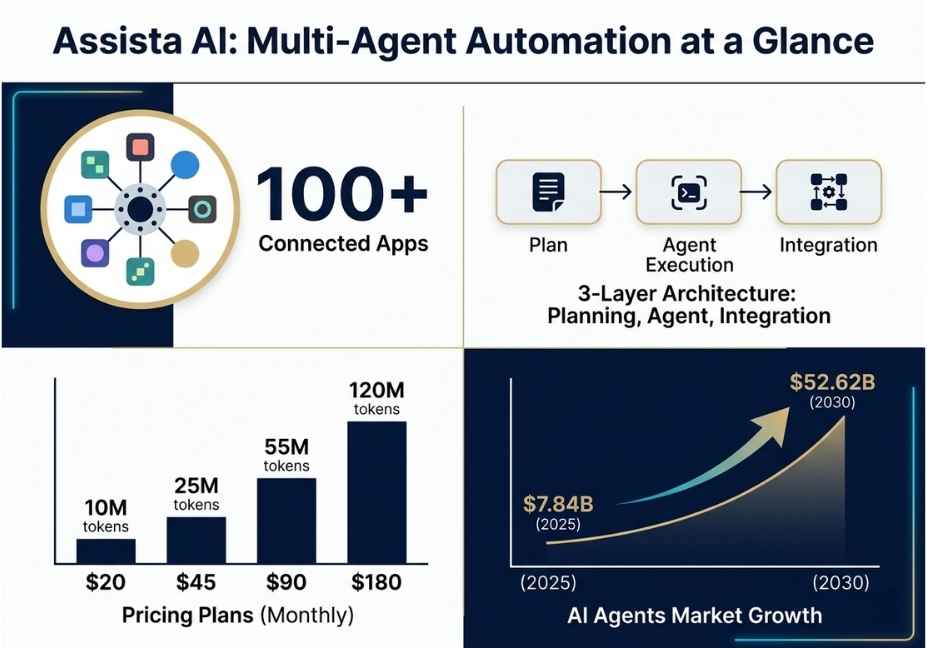
Assista AI is a multi-agent automation platform. It connects to over 100 productivity apps, including Gmail, Slack, HubSpot, Notion, Asana, Stripe, and LinkedIn. Then, it converts natural-language instructions into executed workflows.
Unlike a single model attempting every step, Assista deploys cooperating agents that specialize. For instance, one agent researches, another drafts, a third schedules, and a fourth updates records. This setup reflects the broader concept of an intelligent agent: a system that perceives its environment, in this case your connected apps, and acts to reach a goal.
What truly sets Assista apart, however, is its integration layer. This is the connective tissue that lets agents read and write across different systems within one continuous workflow, similar in spirit to how Anthropic’s Claude or OpenAI’s models use function calling to trigger external actions.
How Does Assista AI Work?
In short, Assista’s architecture has three layers working together. First, the planning layer parses the natural-language request and performs task decomposition into ordered sub-tasks. Second, the agent layer assigns specialized agents, covering research, drafting, data, and communication, to handle each sub-task. Third, the integration layer executes API calls against the 100+ connected apps and returns results to the planner.
This setup is conceptually similar to how LangChain’s agent orchestration framework chains tool calls through a reasoning loop. However, Assista pre-builds this orchestration, so non-technical users never touch the underlying logic.
Pro Tip: When designing a multi-step Assista workflow, describe it as a sequence of verbs, such as “pull, format, send,” rather than one vague outcome. As a result, the planning layer gets cleaner task decomposition boundaries, which reduces the chance of skipped steps.
Additionally, the agent memory component matters here. Without persistent memory, an agent re-running a daily report has no way to compare today’s numbers against yesterday’s. Consequently, context window limitations force re-fetching data every run, which increases token consumption and latency.
What Can You Use Assista AI For? 5 Real-World Examples
Assista AI supports a wide range of workflows. Here are five practical examples:
First, financial reporting: agents pull revenue data from Stripe, update a Google Sheet, generate a PDF, and distribute it via Slack and email.
Second, lead enrichment and outreach: research agents gather prospect data, drafting agents personalize outreach emails, and a scheduling agent queues the sends.
Third, brand monitoring: agents search Reddit and other platforms for keyword mentions, aggregate the results, and log them to a database.
Fourth, internal knowledge management: agents monitor Slack conversations, summarize key decisions, and push updates into a Notion knowledge base.
Fifth, calendar and task triage: agents organize incoming requests across Gmail and Asana into prioritized daily task lists.
Did You Know? The global AI agents market is projected to grow from roughly $7.84 billion in 2025 to $52.62 billion by 2030. This shows that multi-agent orchestration platforms like Assista are riding a steep adoption curve, not a passing trend.
How Does Assista AI Compare to LangChain, AutoGen, and Zapier?
Developers often ask how a no-code multi-agent platform stacks up against building on a framework directly. Here’s a practical comparison:
Assista AI is best for non-technical teams and fast setup. Its strength is multi-agent collaboration, broad app integrations, and a no-code interface. Its limitation is less granular control over agent logic.
LangChain is best for developers building custom agents. Its strength is full control over chains, tools, and memory. Its limitation is that it requires coding and infrastructure.
AutoGen is best for multi-agent research and development environments. Its strength is flexible agent-to-agent conversation patterns. Its limitation is a steeper learning curve and the need for self-hosting.
Zapier is best for simple, linear automations. Its strength is a massive app library and easy triggers. Its limitation is rule-based logic rather than true agentic reasoning.
Architect’s Note: If your team needs auditable decision traces or custom tool definitions via OpenAI function calling, a framework-based build offers more transparency. On the other hand, if your priority is shipping a working automation today without engineering time, a platform like Assista trades some control for speed.
How Do You Build a Workflow in Assista AI? Step-by-Step
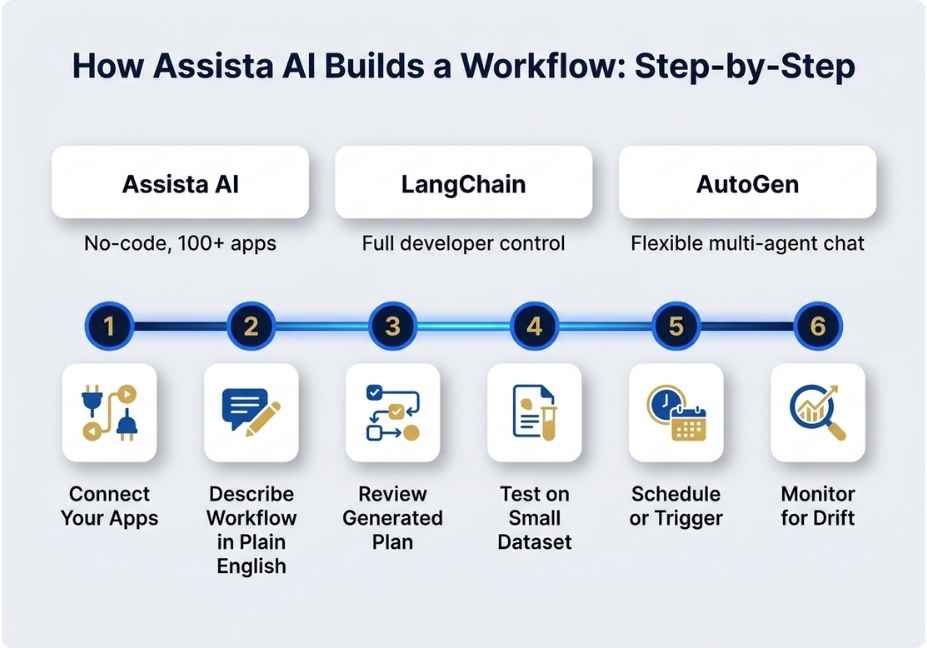
Building a workflow involves six steps. First, connect your apps by authorizing the integrations relevant to your workflow, such as Stripe, Google Sheets, and Slack. Second, describe the workflow in plain English, being explicit about trigger conditions, data sources, and the final output format.
Third, review the generated plan, since Assista’s planning layer shows the decomposed steps before execution. Fourth, test the workflow on a small dataset, running it once manually before scheduling recurring execution. Fifth, schedule or trigger the workflow, setting it to run on a cadence or in response to an event, such as a new email or new row. Finally, monitor outputs for drift, periodically checking that agent outputs still match your intent, especially after connected apps update their APIs.
Here’s a conceptual example of how a multi-agent task request might be structured:
A weekly workflow could include three steps: a data agent fetches revenue from Stripe, a data agent updates a Google Sheet, and a communication agent sends a summary via Slack.
Technical Disclaimer: Platform interfaces and integration lists evolve rapidly. Details in this article reflect Assista AI’s offering as of mid-2026. Always check the official site for current integrations and pricing.
What Are Common Mistakes When Using Assista AI?
Several mistakes commonly trip up new users. For instance, over-broad requests, such as “manage my inbox,” give the planning layer too much ambiguity, which increases hallucination risk in the actions it chooses.
Similarly, skipping the review step before automation is risky. Therefore, always test a workflow manually before scheduling it to run unattended. Furthermore, ignoring token and task limits can cause problems, since heavier workflows consume more of your monthly allocation; monitoring usage helps prevent automations from silently stopping mid-month.
Finally, assuming zero maintenance is a common error. Connected apps change their APIs over time, and although agent memory helps maintain context, workflows still need periodic review.
Notably, researchers at Stanford CRFM have found that production AI agent failures are frequently traced to poorly scoped tool-use loops rather than model quality. This finding applies just as much to no-code agent platforms as to custom-built ones.
What Are Developers Saying About Assista AI?
Discussions in developer communities on platforms like Reddit’s automation forums generally echo a consistent theme: multi-agent no-code platforms are praised for removing integration friction. However, technical users want more visibility into why an agent chose a particular action, essentially a decision trace similar to what chain-of-thought logging provides in custom LLM applications.
Frequently Asked Questions
What is Assista AI used for?
Assista AI is used to automate multi-step business workflows, including financial reporting, lead outreach, and knowledge management, across 100+ connected apps using natural-language commands instead of manual configuration.
Is Assista AI free?
Assista AI offers a free tier with a limited monthly token allocation, around 1 million tokens, suitable for light usage. Paid plans scale from roughly $20 to $180 per month depending on token volume and task limits.
How is Assista AI different from a chatbot?
Unlike a chatbot that only generates text responses, Assista AI’s agents take real actions, reading and writing data across connected apps via an integration layer and orchestration layer, to complete entire workflows rather than just answering questions.
Does Assista AI require coding?
No. Assista AI is designed for non-technical users. Workflows are described in plain English, and the platform’s planning layer handles task decomposition and execution automatically.
Can Assista AI work autonomously without human input?
Yes, Assista AI can run scheduled or triggered workflows without manual intervention. However, best practice is to review generated plans and monitor outputs periodically to catch drift or unintended actions.
Conclusion
In summary, Assista AI represents a practical middle ground in the agentic automation space. It brings multi-agent system orchestration, including task decomposition, specialized agents, and an integration layer spanning 100+ apps, to users who don’t want to build on LangChain or AutoGen directly.
That said, the tradeoff is less granular control in exchange for speed of deployment. For teams evaluating it, the key considerations are token budgets, workflow scoping to reduce hallucination risk, and periodic monitoring as connected APIs evolve. Bookmark this guide and explore more hands-on AI agent tutorials at agentiveaiagents.com.
12 Responses