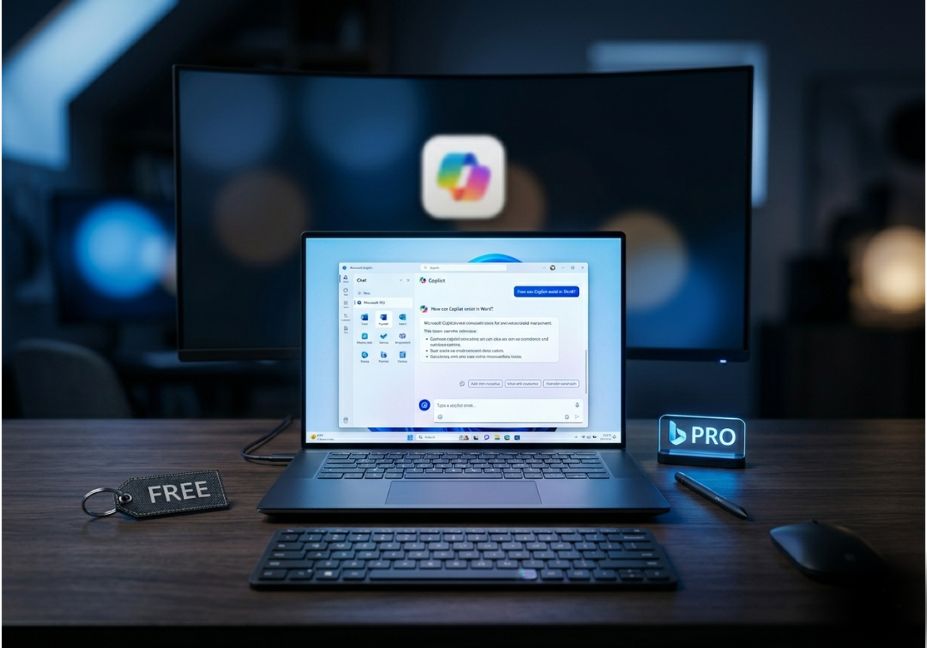
Most professionals assume the free version of Microsoft Copilot is just a watered-down chatbot a demo experience designed to nudge you toward a paid plan. That assumption is increasingly wrong, and it’s also masking a more interesting question: at what point does Copilot Pro’s $20/month subscription unlock workflows that the free tier genuinely cannot replicate?
The answer in 2026 has more nuance than most comparison articles admit. Microsoft has progressively extended GPT-4 Turbo access to free-tier users, blurring one of the original selling points of Copilot Pro. At the same time, Agent Mode the ability to run multi-step, autonomous task execution directly inside Word, Excel, and PowerPoint has gone generally available for Microsoft 365 subscribers, reshaping what “Pro” actually means.
If you’re a developer, knowledge worker, or technical decision-maker choosing between free Copilot and the paid tiers, this breakdown cuts through the marketing noise and focuses on the architectural differences that matter.
What Is Microsoft Copilot (Free)?
Microsoft Copilot is a web-based chat tool powered by generative AI built on GPT-4 and grounded in the Bing search index, which means it can connect to current information available on the web. It’s accessible through Windows 11, Microsoft Edge, Bing, and a standalone web app. The free tier gives you a capable assistant for research, drafting, brainstorming, image analysis, and AI image generation via DALL-E 3 with 15 image boosts per day. TechTarget
The key constraint isn’t model intelligence. It’s context and integration. The free tier operates as a standalone assistant. It doesn’t read your documents, your email threads, or your meeting transcripts. There’s no persistent memory of your workflows, no organizational grounding, and no ability to act across applications.
The Model Access Gap and Why It’s Smaller Than You Think
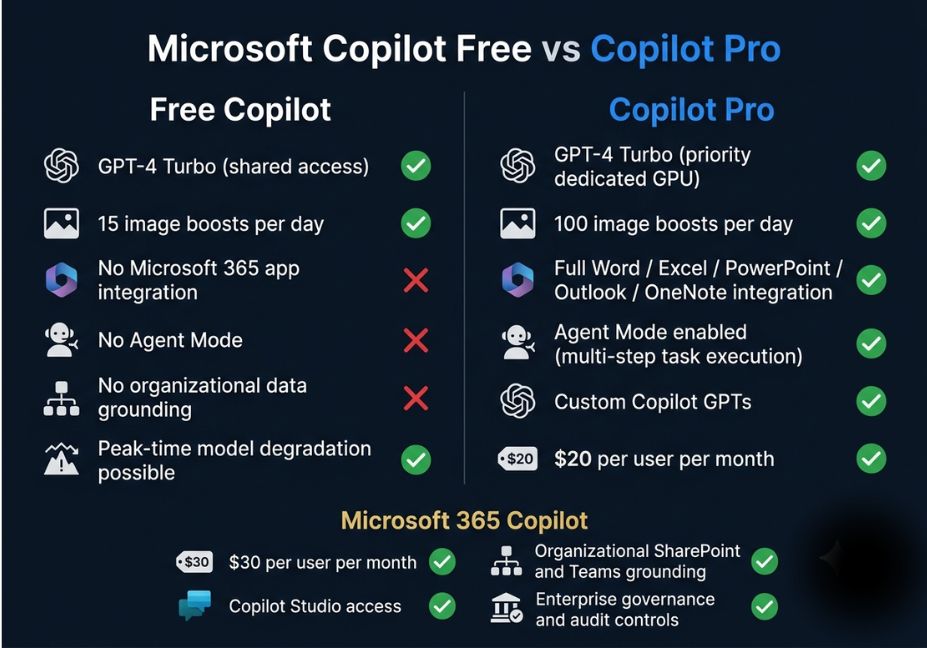
When Copilot Pro launched in early 2024, exclusive GPT-4 Turbo access was one of its headline features. That gap has since narrowed significantly. Copilot Pro includes priority access to GPT-4 and GPT-4 Turbo, including during peak times, while the free version will drop down to an older model during high demand, whereas Copilot Pro remains on GPT-4 and GPT-4 Turbo. Windows Central
What this means practically: for standard conversational tasks drafting emails, summarizing articles, answering technical questions the free tier and Copilot Pro now produce outputs of essentially equivalent quality. The model is the same. What differs is reliability and throughput. During peak periods, users of the free Copilot experience will be downgraded as needed to ensure that Copilot Pro users are prioritized for a faster experience. Microsoft Learn
For a power user running 30–50 complex queries a day, that degradation compounds quickly. For occasional users, it rarely surfaces. The more durable differentiator is not model access at all it’s agentic integration into the Microsoft 365 productivity suite.
The Real Upgrade: Agent Mode and Office Integration
This is where Copilot Pro earns its cost or doesn’t, depending on your workflow.
With a Copilot Pro subscription tied to a Microsoft 365 Personal or Family plan, you gain the Copilot assistant embedded directly into Word, Excel, PowerPoint, Outlook, and OneNote. More significantly, agentic capabilities in Word, Excel, and PowerPoint are now generally available, meaning Copilot can take multi-step, app-native actions directly in your documents, worksheets, and presentations helping you move from first draft to finished output without leaving the app. Microsoft
In Word, Copilot can pull context from related files, emails, and meetings to update reports automatically. Users can refine documents by asking Copilot to shorten text, restructure sections, or add new content. In Excel, Agent Mode offers integrated web search to pull external data directly into workbooks, with users able to choose between OpenAI and Anthropic reasoning models for analysis tasks. In Outlook, one-tap prompts such as “Triage my inbox” and “Summarize and reply” are generally available across Outlook for Windows, web, iOS, Android, and the classic desktop app. NeowinPetri
This distinction matters architecturally. The free Copilot is a stateless conversational interface. Agent Mode in the Pro and M365 tiers is a genuine orchestration layer the AI reads your context, decomposes a task into steps, executes them across apps, and returns a structured output. That’s a qualitatively different kind of workflow automation.
Pro Tip: If your use case involves turning a meeting summary and project brief into a formatted Word report automatically, Agent Mode is the feature that makes that pipeline real. The free Copilot cannot access your files or act across applications it only responds within the chat window.
Copilot Pro vs Microsoft 365 Copilot: Don’t Confuse the Tiers
There are actually three meaningful subscription levels, and conflating Copilot Pro with Microsoft 365 Copilot is a common and costly mistake especially for small business buyers.
Copilot Pro at $20 per user per month is designed for individuals with personal Microsoft accounts. It integrates with Microsoft 365 Personal or Family subscriptions, enables Agent Mode in Office apps, but has no organizational data grounding. It cannot read SharePoint libraries, Teams transcripts, or enterprise file stores, and it does not include Copilot Studio for building shareable AI agents.
Copilot for Microsoft 365 is priced at $30 per user per month and offers a boost in performance and integration with both web and desktop Office apps, along with deeper enterprise capabilities. This tier provides full organizational grounding via Microsoft Graph, access to SharePoint, Teams, and Exchange data, and Copilot Studio for building and deploying custom AI agents at scale with enterprise governance controls including audit logs, compliance tracking, and sensitivity labels. TechTarget
Microsoft also launched Microsoft 365 Copilot Business, which is the same offering as Microsoft 365 Copilot but slightly cheaper and made for small businesses. It launched in December 2025 at approximately $21 per user per month and is a strong entry point for teams under 50 seats. Hungerford
If you’re building agentic workflows that need to ground against organizational knowledge SharePoint libraries, Teams channels, or Exchange data Copilot Pro is the wrong tier. The $20 per month plan explicitly cannot access enterprise data stores.
Where Copilot Pro Falls Short
No honest comparison skips the failure modes. Copilot Pro has several worth naming.
There is no persistent memory across sessions. Copilot Pro resets context between conversations unless you’re working within a named document. There’s no equivalent to ChatGPT’s Memory feature for arbitrary multi-session workflows a real limitation for users who want the assistant to learn their preferences over time.
Agent Mode also requires the full Microsoft 365 stack to function. It is only available if you subscribe to both Copilot Pro and Microsoft 365 Personal or Family. Copilot Pro alone, on a free Microsoft account, delivers priority model access and extra image boosts but not the in-app Office agent integrations. A surprising number of users discover this only after subscribing.
Custom Copilot GPTs are limited to personal workflows. You can build task-specific assistants for your own use, but they cannot be published or shared as deployable agents across a team. That capability lives exclusively in Copilot Studio, which requires the $30 Microsoft 365 Copilot tier.
Finally, there is no API access. Developers building applications on top of Copilot capabilities need Azure OpenAI Service or the Microsoft 365 Copilot APIs directly a consumer Copilot Pro subscription does not grant programmatic access to the underlying models.
Who Should Use What
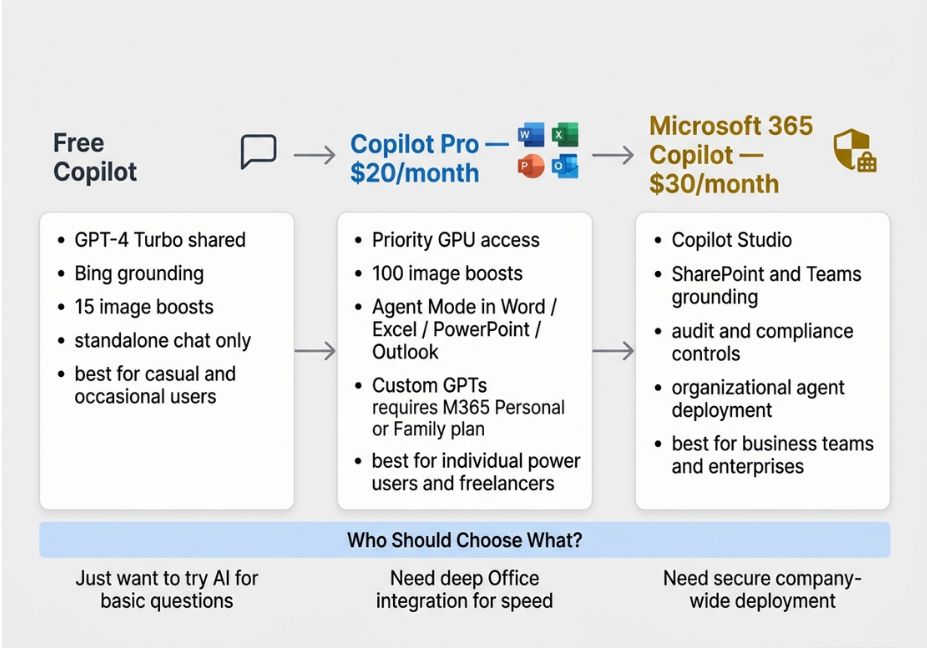
The free Copilot is the right choice if your use case is conversational research, drafting, Q&A, and general productivity without deep Microsoft 365 integration. It’s also the correct starting point for developers evaluating the assistant before building directly on Azure OpenAI Service. If your daily query volume is modest and you don’t rely on Office apps for document-heavy workflows, the free tier is genuinely competitive.
Upgrade to Copilot Pro if you actively work in Word, Excel, Outlook, or PowerPoint and want AI assistance embedded in context rather than in a separate chat window. The priority model access matters if you’re a high-volume user who can’t afford degraded responses during peak hours. It’s the right tier for individual freelancers, creators, and power users not for business teams who need organizational data access.
Choose Microsoft 365 Copilot if you need AI grounded in your company’s knowledge base, if you’re deploying AI workflows across a team, or if Copilot Studio’s agent-building capabilities are part of your technical roadmap. Governance, compliance, and audit trails are requirements at this tier, and the architecture is designed accordingly.
FAQ
Free Copilot is a standalone AI chat assistant built on GPT-4 Turbo, accessible through Windows, Edge, and Bing. Copilot Pro adds priority model access with no peak-time degradation, direct integration with Word, Excel, PowerPoint, Outlook, and OneNote, 100 daily image boosts instead of 15, and Agent Mode for multi-step autonomous task execution inside Office apps. The core model is now the same the upgrade is reliability, depth of integration, and agentic capability.
It depends on your Microsoft 365 usage. If you regularly work in Word, Excel, or Outlook and would benefit from in-context AI assistance drafting, summarizing, formatting, or running multi-step document generation the productivity gain is tangible. If you only need a chatbot for general queries, the free tier has narrowed the gap considerably. The practical test: are you losing time switching between a chat interface and your Office apps? If yes, Pro pays for itself quickly.
Yes. Microsoft rolled out GPT-4 Turbo to all free Copilot users as the default model. The practical difference is reliability: during peak periods, free-tier users may experience routing to older or smaller model variants, while Copilot Pro subscribers receive dedicated GPU capacity and consistent GPT-4 Turbo performance regardless of load.
Yes but only if you also have an active Microsoft 365 Personal or Family subscription. Copilot Pro alone, without a qualifying M365 plan, does not enable the in-app Copilot assistant or Agent Mode. When paired correctly, you get fully embedded AI in Word, Excel, PowerPoint, OneNote, and Outlook, including multi-step Agent Mode for autonomous document and data workflows.
Copilot Studio is Microsoft’s low-code platform for building, configuring, and deploying custom AI agents that can be shared across an organization. It is not available with Copilot Pro. Copilot Studio is part of the Microsoft 365 Copilot enterprise subscription and targets organizations building agents grounded in SharePoint, Teams, and enterprise data not individual power users.
Conclusion
The Microsoft Copilot vs. Copilot Pro decision in 2026 comes down to three honest takeaways. The model gap has largely closed free Copilot now runs GPT-4 Turbo and is a legitimate productivity assistant for everyday tasks. The real differentiator is agentic integration: Copilot Pro’s value proposition lives in Agent Mode across Word, Excel, and PowerPoint, the ability to go from a prompt to a context-aware, formatted document without leaving the app. And individual users and enterprise teams should be buying different tiers Copilot Pro is built for personal power users, while Microsoft 365 Copilot is built for organizations that need grounding, governance, and scalable agent deployment.
For deeper dives into building agentic workflows on Microsoft’s AI stack including Copilot Studio architecture, Power Automate integrations, and custom agent design explore the hands-on guides at agentiveaiagents.com.