
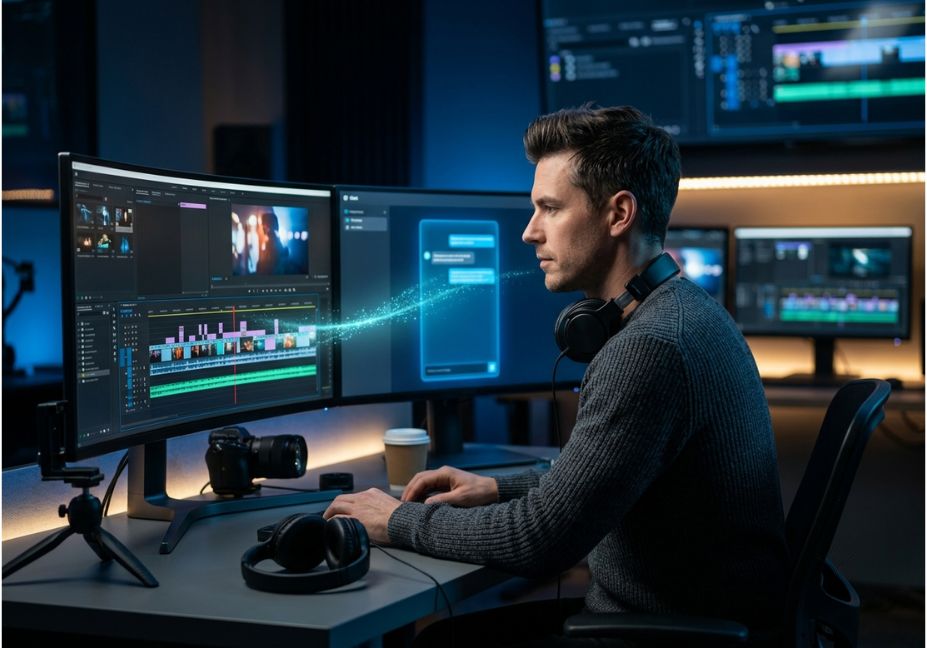
Most creators lose the editing war before they even open the timeline. A 15-minute screen recording still eats an hour of trimming, captioning, and reformatting. That’s before anyone touches color or audio. AI video editing software promised to fix this years ago. But 2026 is the first year that promise splits into two real categories.
The first category adds an AI panel to a manual timeline you still operate. The second lets an AI agent run the timeline itself. This second category exists because of the Model Context Protocol (MCP) the open standard Anthropic built so models like Claude can call external tools directly. Editors that expose an MCP server let Claude Code trim dead air, generate a B-roll clip, or reorder a sequence. No human has to drag a single clip.
This guide ranks the best ai video editing tools 2026 has to offer across both categories. So you can pick the right one for how you actually work, not the one with the flashiest demo.
What Is AI Video Editing? {#what-is-ai-video-editing}
AI video editing covers software that automates tasks a human editor used to do by hand. That includes cutting silence, removing filler words, generating captions, reframing for vertical formats, and matching color.
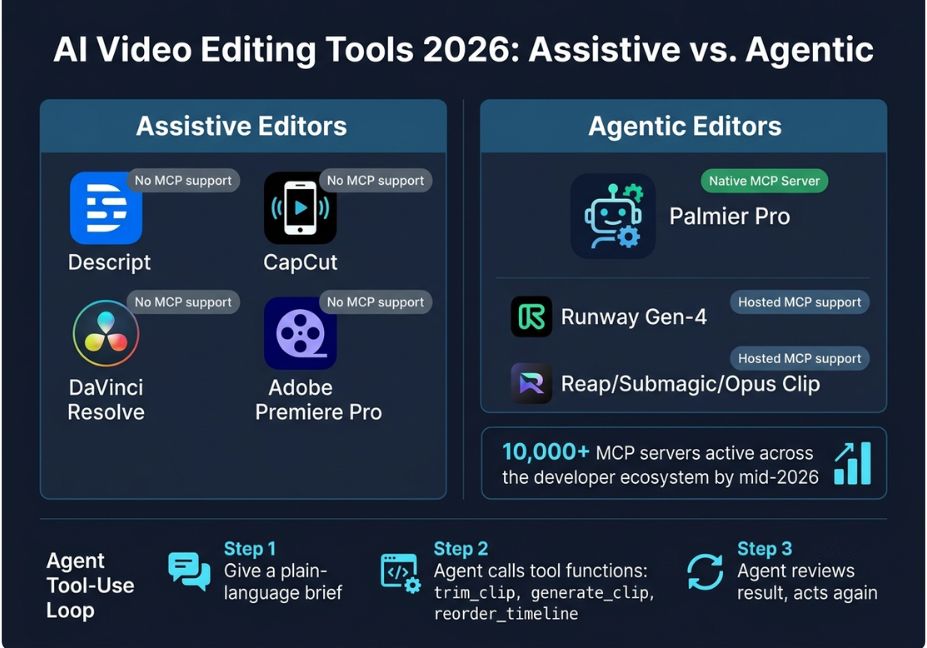
Most 2026 tools sit on a spectrum. On one end: assistive tools, where a feature panel sits on top of a traditional non-linear editor (NLE). On the other: agentic tools, where a model reads the project state and calls edit functions as tools the same tool-use loop that powers coding agents.
The distinction matters for one simple reason. An assistive tool still needs you to review and click. An agentic one can run a multi-step brief on its own.
How Do AI Video Editing Agents Work? {#how-do-ai-video-editing-agents-work}
Agentic editors expose their timeline, media bin, and export functions as callable tools through an MCP server. Claude Code or Cursor, OpenAI’s Codex, or any MCP-compatible client connects to that server. It reads the current project state and reasons about what to do next.
Here’s what that looks like in practice:
- You give a plain-language brief: “Trim the dead air, generate an establishing shot of a rainy street, then reorder scenes 2 and 3.”
- The agent breaks that brief into individual tool calls:
trim_clip,generate_clip,reorder_timeline. - Each call returns a result. The agent inspects that result before deciding the next action. This is the same tool-use loop used in coding agents, just pointed at a video project instead of a codebase.
Architect’s Note: This only works when the editor’s internal state clips, in/out points, track order is exposed as structured, machine-readable data, not just pixels on a canvas. An editor with a beautiful UI but no exposed state can’t be operated by an agent. It doesn’t matter how good its built-in AI features look in a demo.
Did You Know? By mid-2026, more than 10,000 MCP servers were active across the developer ecosystem. They span everything from ad platforms to creative tools. Video editing is one of the newest categories to adopt the protocol.
Best AI Video Editing Tools Compared {#best-tools-compared}
Here’s how the top ai video editors of 2026 break down, grouped by what each one is actually built to do.
| Tool | Category | Best for | Agent/MCP support |
|---|---|---|---|
| Palmier Pro | Agentic NLE | Agent-operated timeline editing on Mac | Native MCP server, free/open-source core |
| Descript | Transcript editor | Podcasts, talking-head video | Available via third-party Descript MCP |
| CapCut | Mobile/AI-assisted | Short-form social editing, YouTube Shorts | None (closed, no MCP) |
| DaVinci Resolve Studio | Pro NLE + AI panel | Colorists, one-time-purchase value | None (closed, no MCP) |
| Adobe Premiere Pro (Sensei/Firefly) | Pro NLE + generative AI | Teams already in the Adobe ecosystem | None (closed, no MCP) |
| Runway (Gen-4) | Generative video | Text/image-to-video clip generation | MCP available for generation, not timeline editing |
| Final Cut Pro | Pro NLE (Apple Intelligence) | Mac-only creators | None (closed, no MCP) |
| Reap / Submagic / Opus Clip | Repurposing tools | Long-form-to-short-form clipping at scale | Hosted MCP servers for clipping/captioning tasks |
This table doubles as a quick answer for anyone comparing ai video editing software for beginners against pro-grade, agent-ready tools.
Pro Tip: If your workflow is “generate raw footage, then finish it,” pair a generative tool’s MCP server with an editing tool’s MCP server in the same Claude Code session. Generate with one, assemble with the other, all without leaving the conversation.
Agentic vs. Assistive Editors: What Actually Changes {#agentic-vs-assistive}
Descript pioneered editing a video by editing its transcript. Delete a word, and the cut follows. It’s still the most mature tool for talking-head and podcast editing. But its AI features function as an editing assistant, not a timeline operator. You’re still the one making creative calls.
CapCut, DaVinci Resolve, and Premiere are traditional NLEs with AI features layered on top auto-caption, scene detection, auto-reframe. None currently expose an MCP server. So an agent can nudge you toward a better edit, but it can’t reach in and make one.
Technical Note: Generative tools like Runway, Pika, and Kling are often mislabeled as “editors.” They generate clips; they don’t assemble timelines. You still have to export the clip and drop it into a separate editor. The one exception is an open-source, agent-operable editor where generation and editing share a single project file.
Step-by-Step: Building an Agent-Operated Editing Workflow {#step-by-step}
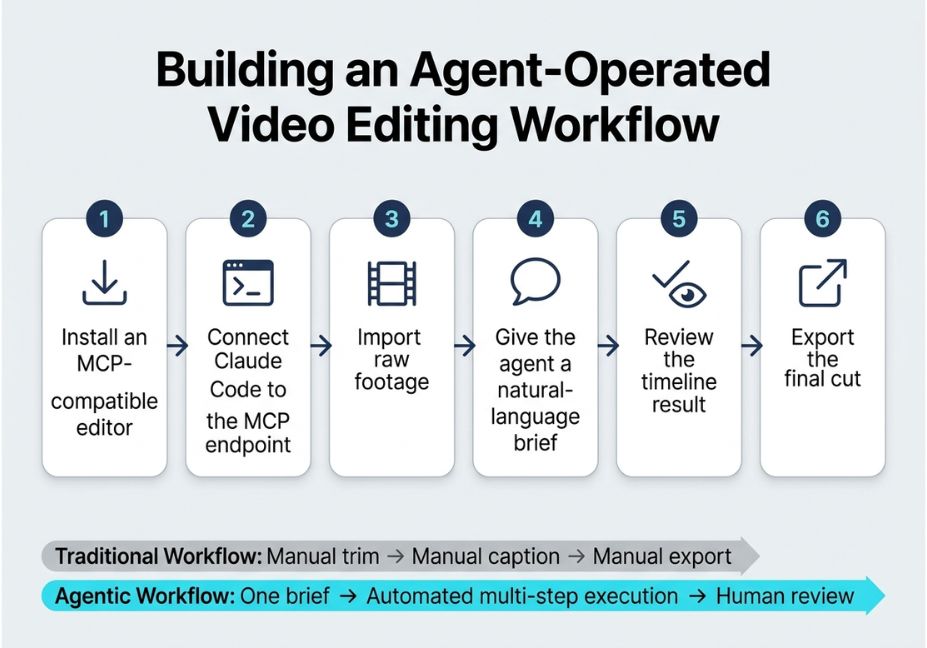
- Install an MCP-compatible editor. Palmier Pro is currently the clearest reference implementation. Its GitHub repo ships the full editor, MCP server, and in-app agent chat as open source.
- Connect Claude Code to the editor’s MCP endpoint. This takes one line in your terminal.
- Import your raw footage into a new project.
- Give the agent a natural-language edit brief. For example: trim silence, generate a missing establishing shot, apply captions, reorder sequences.
- Review the timeline result. Then ask for targeted revisions instead of a full re-edit. The agent only needs to re-run the affected tool calls.
- Export once the cut matches your brief.
# Example: connecting Claude Code to an MCP video editor endpoint
# (run once per project session)
claude_mcp_command = "claude mcp add --transport http palmier-pro http://127.0.0.1:19789/mcp"
Technical Disclaimer: MCP server implementations and editor APIs change quickly. The command above reflects Palmier Pro’s setup as of mid-2026. Always check the tool’s own docs for the current syntax before running it.
Common Mistakes and How to Avoid Them {#common-mistakes}
- Assuming any “AI editor” can be agent-operated. Most can’t. Check specifically for an exposed MCP server, not just an AI feature panel.
- Skipping human review on batch jobs. Agent-driven pipelines compound small errors, the same way any multi-step agentic system does. Treat editing agents the way you’d treat a coding agent’s pull request: review before you merge.
- Confusing generation with editing. A tool that produces stunning generative clips (Runway, Higgsfield, Flora) usually still needs a separate assembly step, unless it’s paired with an editor.
- Ignoring provenance and rights. If an agent pulls stock or generated footage into a client project, confirm licensing before it ships. The agent won’t flag that for you unless you ask it to.
Reliability failures in agentic pipelines aren’t unique to video. Industry analysis suggests the era of one general-purpose model handling everything is fading. In its place: fleets of specialized agents one for retrieval, one for image generation, one for video creation that coordinate on complex work. Video editing agents are simply the newest instance of that pattern. So they inherit the same orchestration challenges enterprise teams are already working through.
What Developers Are Saying {#developers-saying}
Early adopters connecting Claude Code to MCP-native editors describe a real shift. Before, they were “the courier between the AI and the editor.” Now, the agent and the timeline live in the same place. You ask for a trim or a regenerated clip, and you see the result immediately, with no exporting and re-importing between separate tools.
This mirrors how developers describe working with any well-scoped autonomous software agent. The value isn’t the novelty. It’s removing the manual handoff.
FAQ People Also Ask {#faq}
What is the best AI video editing tool in 2026?
There isn’t one universal winner. The best AI video editing tool depends on your workflow. Descript remains strongest for transcript-based podcast and talking-head editing. CapCut leads for mobile short-form. DaVinci Resolve Studio offers the best value for colorists. Palmier Pro leads the newer agent-operable category.
Can AI agents edit video automatically?
Yes, but only in editors that expose their timeline through a protocol like MCP. An agent such as Claude Code can then call functions to trim, reorder, caption, or generate clips directly, executing a full brief with minimal manual intervention.
What’s the difference between an AI video editor and an AI video generator?
An AI video generator (Runway, Pika, Kling) creates new footage from text or image prompts. An AI video editor assembles, trims, and finishes existing or generated footage into a final cut. Most workflows still need both, unless the editor and generator share one project.
What is MCP in AI video editing?
MCP, or Model Context Protocol, is an open standard that lets AI models call external software as structured tools. In video editing, an MCP server exposes an editor’s timeline and media functions. That lets an agent like Claude operate them directly.
Is CapCut or Descript better for AI editing?
CapCut suits fast, template-driven short-form editing on mobile. Descript suits transcript-based editing for long-form talking-head content. Neither currently supports agent-operated editing via MCP. Both keep a human in the editing loop.
Do I need coding skills to use AI agents for video editing?
No. Connecting an agent to an MCP-enabled editor usually takes one terminal command or a one-time connector setup. After that, you give edits in plain language, the same way you’d brief a human editor.
Conclusion
The best ai video editing tools 2026 offers aren’t one single winner. They split into two real categories. If you want assistive AI wrapped around a familiar manual workflow, Descript, CapCut, DaVinci Resolve, and Premiere remain the safest, most mature picks. If you want an AI agent to actually operate the timeline for you, the MCP-native tier led right now by open-source editors like Palmier Pro is where the workflow is heading.
Either way, match the tool to how hands-on you want to be. Don’t just pick whichever one has the loudest launch video. Bookmark this guide, and explore more hands-on agentic workflow tutorials at agentiveaiagents.com.



