
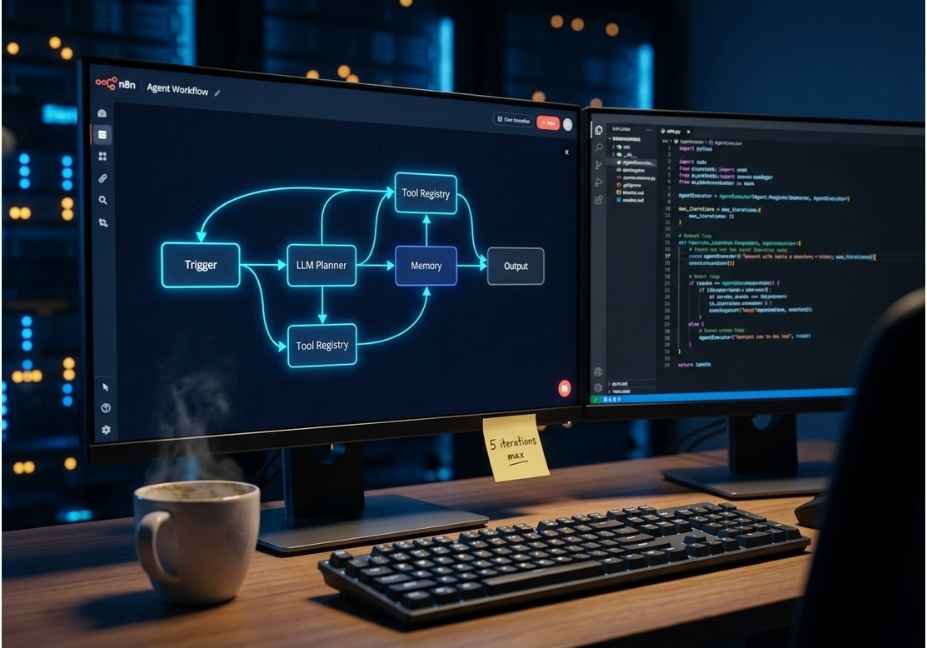
Unfortunately, most teams select a workflow automation solution based on one of three criteria: Aesthetic (“the app with the prettiest drag and drop interface”), Functionality (“the app that allows me to create workflows the fastest, and/or has the most variety of integrations with the most manageable integration requirements”), and/or Marketing (“the app that my favorite influencer recommended on Youtube”).
The unintended consequence of these criteria is that as soon as your team approves development on a workflow, it goes into what’s referred to as a ARe.lAB group, which in this context means “development will be complete in approximately 24 hours.” Once your team builds the workflow, it gets initially run by an agent who will use an agent call to retrieve workflow results, three times in a row, and be billed for each attempt because there were no cap limits per iteration.
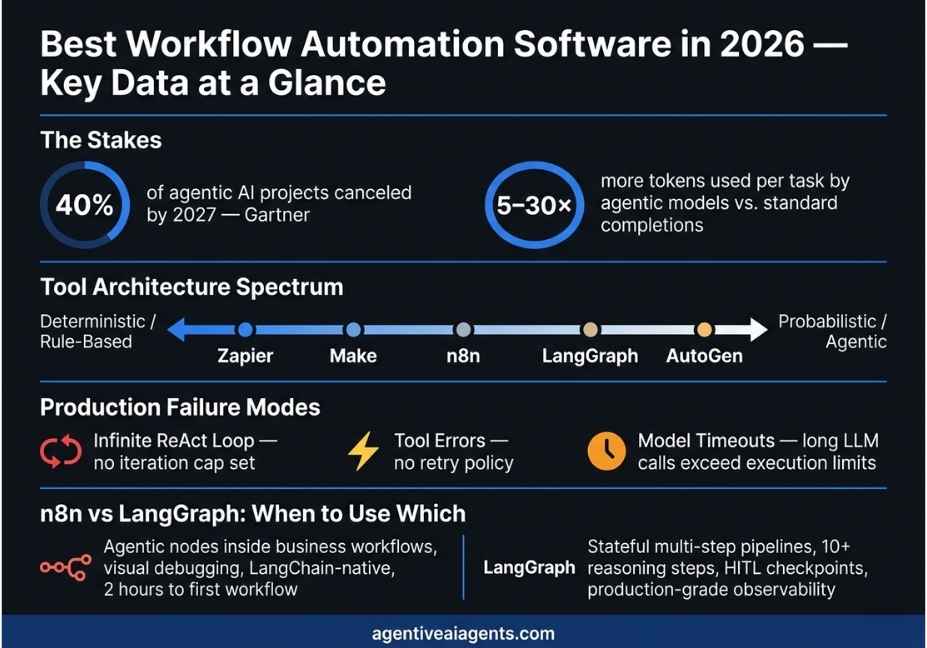
Based on a 2026 report from Elementum AI citing Gartner, 40% of projects leveraging agentic AI to build integrations will be canceled by December 31, 2027. Most of these cancellations occurred because an architectural error was made when selecting the tool, establishing a governance model, and designing the integration layer; none of these issues relates to poor models or data quality.
What Is Workflow Automation Software?
Workflow automation software replaces manual, repetitive process steps with automated logic. It moves data between systems, fires actions based on events, and routes tasks to the right destination all without human intervention at each step.
The category is, however, far broader than most teams realize. At one end sit integration platforms like Zapier and Make, which are built entirely on if/then logic. At the other end sit agentic orchestration frameworks like LangGraph and AutoGen, where an LLM decides which tools to call, in what order, based on live context at runtime.
That distinction matters enormously. A trigger-action pipeline is deterministic the same input always produces the same output. An agentic workflow is, by contrast, probabilistic. The model reasons through the task dynamically. This introduces both the power to handle unstructured inputs and failure modes that fully deterministic systems never have to contend with. Understanding which type of tool your process needs is, therefore, the single most important decision you will make before you start building.
How Agentic Workflow Automation Works in 2026
Traditional workflow automation follows a predefined execution path. The flow goes: Trigger, then Step A, then Step B, then Output. Every branch must be anticipated by the developer before the workflow ever runs. This approach works well for structured, repeatable processes syncing a CRM field, firing a Slack notification, generating a weekly PDF report.
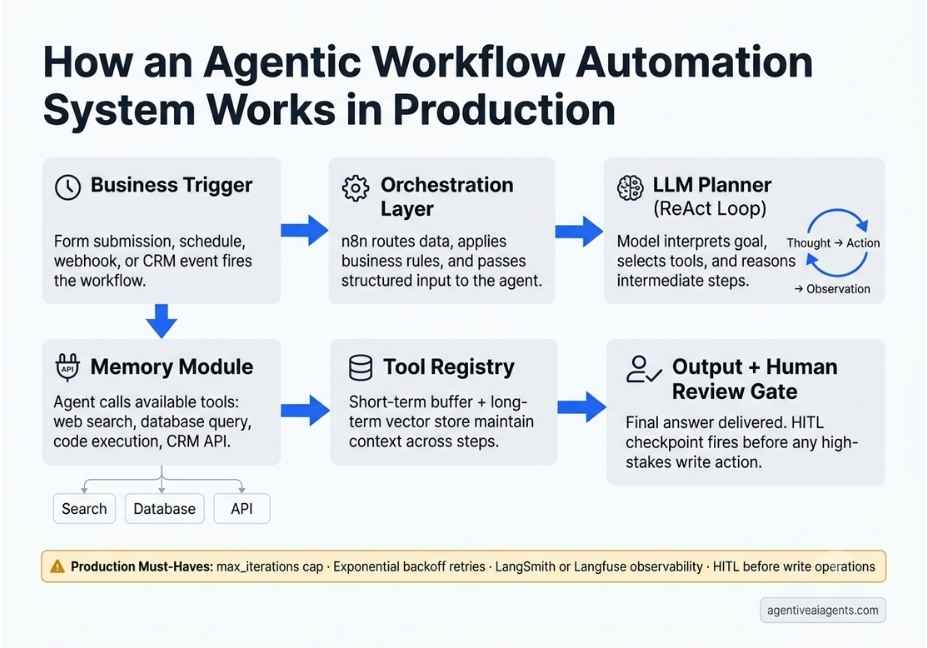
Agentic workflow automation introduces a reasoning layer between trigger and output. Instead of following a hardcoded path, the system uses a large language model to interpret the task, select tools, and adapt its behavior based on intermediate results. This pattern is formalized in the ReAct pattern for reasoning and acting in language models (Yao et al., 2022), where the model alternates between Thought, Action, and Observation in a loop until it reaches a final answer or hits a termination condition.
In practice, the architecture that supports this has four core components. First, the planner the LLM backbone interprets the goal and decides what action to take next. Second, the tool registry provides the set of callable functions the model can invoke: APIs, web search, code execution, and database queries. Third, the memory module handles short-term conversation buffering alongside long-term retrieval through a vector store. Fourth, and most critically, the orchestration layer manages execution sequencing, retry policies, state persistence, and human-in-the-loop checkpoints.
Best Workflow Automation Software Compared: Architecture, AI Readiness, and Team Fit
The market in 2026 breaks cleanly into four categories. The right way to read this comparison is not “which tool is best” but rather “which tool is best for the kind of process I am automating.” Each category solves a genuinely different problem.
Zapier Best for Non-Technical Teams and SaaS Integration
Zapier is the most widely used integration iPaaS platform in the world. It runs on if/then logic low autonomy, high control, fast to configure, and reliable at scale. Zapier is not AI-native, though it has added AI processing steps as optional modules. It is the right choice when your process is structured, your inputs are predictable, and you want a non-technical team member to own and maintain the automations without engineering support. For AI agent workflows, however, Zapier sits at the wrong end of the spectrum entirely.
Make (formerly Integromat) Best for Visual Multi-Branch Logic
Make is similarly a visual automation platform. It excels at high-volume, multi-branch workflows where deterministic routing and visual debugging matter. Operations teams that build conditional logic across five or more SaaS tools consistently prefer Make over Zapier for its greater flexibility. Like Zapier, it is not AI-native. Furthermore, its pricing model scales with operations count, which means complex agentic workflows which generate many internal operations per run can become expensive quickly.
n8n Best for AI Agents Inside Real Business Workflows
n8n is, in many respects, the most important tool on this list for developers building agentic systems in 2026. It is a fair-code workflow engine that ships a native AI Agent node, which wraps LangChain primitives tools, memory, and output parsers inside the standard workflow canvas. n8n’s native AI Agent node wraps LangChain primitives, giving engineers both visual debugging and full code-level control in the same environment.
The practical advantage is significant. n8n handles all the surrounding business logic scheduling, triggering, data routing, external API calls, retry policies, and Slack notifications while the embedded agent handles the unstructured reasoning. One team in the n8n community reported spinning up their first agentic workflow in two hours, roughly three times faster than writing equivalent Python controls for LangChain directly. The self-hosted Community Edition is free, which makes it particularly attractive for teams with data residency requirements or GPU infrastructure for local models via Ollama.
LangGraph Best for Complex Stateful Multi-Step Agent Pipelines
LangGraph is a code-first agent framework designed specifically for high-autonomy pipelines that require fine-grained state management. LangGraph for stateful multi-agent orchestration matured significantly in 2026, adding persistent state management, human-in-the-loop interruption points, parallel node execution, and native LangSmith observability integration.
LangGraph is the correct choice when your agent needs to loop across ten or more reasoning steps, maintain memory across multiple executions, or handle edge cases that a visual builder cannot express in node logic. It is, however, more complex to configure than n8n. Teams without prior LangChain experience should, therefore, build a simpler pipeline in n8n first and migrate the reasoning-heavy components to LangGraph once they understand the failure modes in production.
AutoGen / Microsoft Agent Framework Best for Multi-Agent Coordination at Enterprise Scale
AutoGen 0.4+ shipped as part of Microsoft’s unified Agent Framework with a full architectural rewrite centered on asynchronous, event-driven multi-agent communication. As a result, it is significantly more scalable than earlier versions for enterprise workloads where multiple specialized agents a planner, a researcher, an editor need to coordinate without blocking each other. It is the strongest choice for organizations already on the Azure stack or building role-based multi-agent systems with strict governance and audit trail requirements.
Workato and ServiceNow Best for Enterprise BPM and Compliance-Heavy Workflows
Workato and ServiceNow are enterprise-grade integration and ITSM platforms. They handle compliance-heavy processes across departments, audit trail requirements, and deep integration with legacy systems like SAP, Oracle, and Guidewire. Both have added AI capabilities ServiceNow through Now Assist, Workato through its Tray AI modules but neither is agent-native in the way n8n or LangGraph is. They are, consequently, the right choice for regulated industries where governance matters more than agentic flexibility.
Real-World Use Cases: Which Tool Fits Which Scenario
Scenario one: Automated lead enrichment and CRM sync. A new lead submits a form. The system enriches the contact with company data from an external API, creates a HubSpot deal, notifies the sales team in Slack, and schedules a follow-up task. This is a deterministic, structured workflow. Zapier or Make handles it reliably with no LLM required, at a fraction of the inference cost.
Scenario two: AI-powered support ticket triage. An incoming Zendesk ticket arrives with unstructured customer text. The system needs to classify urgency, check customer history, decide whether to reply automatically or escalate, and log the decision with reasoning. Because the input is unstructured and the decision requires reasoning, this is exactly the use case n8n’s AI Agent node is designed for. The agent handles the classification and decision; n8n handles the routing, retries, and downstream notifications.
Scenario three: Multi-source research and synthesis pipeline. An agent searches the web across multiple queries, reads and summarizes relevant documents, compares findings, identifies gaps, and produces a structured output all while maintaining state across more than ten reasoning steps with a human review gate before final delivery. This requires LangGraph. A visual builder cannot manage this level of state complexity or provide the fine-grained control over the reasoning loop that production requires.
Scenario four: Multi-agent proposal generation. A planner agent reads a CRM record and decomposes the goal into subtasks. A researcher agent pulls market data and competitor pricing from external sources. An editor agent formats everything into a client-ready document. These three agents need to coordinate asynchronously without blocking each other. AutoGen’s event-driven architecture makes it the right tool for this pattern.
Step-by-Step: Building a Production-Ready Agentic Workflow
The following Python code shows the core agent executor pattern that n8n’s AI Agent node implements natively. It is shown in Python here for architectural clarity. In n8n itself, you configure the equivalent behavior through its LangChain node interface rather than raw code.
from langchain.agents import AgentExecutor, create_react_agent
from langchain_openai import ChatOpenAI
from langchain.tools import tool
from langchain.memory import ConversationSummaryBufferMemory

llm = ChatOpenAI(model="gpt-4o", temperature=0)

@tool
def classify_ticket(text: str) -> str:
    """Classify a support ticket as urgent, normal, or low priority."""
    return llm.invoke(
        f"Classify this ticket in one word (urgent/normal/low): {text}"
    .content

@tool
def fetch_customer_history(customer_id: str) -> str:
    """Retrieve the last five interactions for a customer from the CRM."""
    # Replace with your actual CRM API call in production
    return f"Customer {customer_id}: 3 open tickets, 1 escalation last month."

tools = [classify_ticket, fetch_customer_history]

memory = ConversationSummaryBufferMemory(
    llm=llm,
    max_token_limit=500,
    return_messages=True


agent_executor = AgentExecutor(
    agent=create_react_agent(llm, tools),
    tools=tools,
    memory=memory,
    max_iterations=5,           # Always set this — prevents infinite loops
    handle_parsing_errors=True  # Graceful fallback on malformed model output


result = agent_executor.invoke({
    "input": "New ticket from customer C-4821: My payment failed three times today."

print(result["output"])
Two parameters in this code are non-negotiable in any production deployment. First, max_iterations prevents the agent from entering an infinite ReAct loop when the model fails to emit a stop signal. Five iterations is a reasonable default for most classification and routing tasks. Second, handle_parsing_errors=True means a single malformed model output triggers a graceful retry rather than crashing the entire workflow.
Technical Disclaimer: This example uses LangChain v0.3.x as of June 2026. Because the LangChain API surface changes frequently, always check the official LangChain documentation before deploying to production.
The Five Most Common Failure Modes in AI Workflow Automation
Understanding these failure modes before you build will save your team days of debugging in production.
Failure mode one: No iteration cap on the ReAct loop. The agent enters a thought-action cycle and never emits a stop signal. Without a max_iterations parameter, it runs until the execution timeout or your token budget runs out whichever comes first. Always set this limit explicitly. In n8n’s AI Agent node, the default is ten iterations, which is a reasonable ceiling for most business automation tasks.
Failure mode two: Using an agentic framework for a deterministic task. If every run follows the same steps with structured inputs, a tool like Zapier or n8n’s basic nodes is cheaper, faster, and more reliable than an LLM-driven agent. According to Gartner estimates, agentic models require five to thirty times more tokens per task than a standard completion call. Therefore, use agents only where reasoning is genuinely required.
Failure mode three: No human-in-the-loop checkpoint before write operations. High-stakes actions sending emails, updating CRM records, initiating payments need a human approval gate during initial rollout and validation. LangGraph supports HITL interruption points natively. In n8n, a “Wait for Webhook” node placed before any write operation provides equivalent behavior.
Failure mode four: No observability layer. Without distributed tracing, a failed agent run is nearly impossible to debug. Consequently, pair any LangChain-based system with LangSmith. For a framework-agnostic alternative, Langfuse is open-source and works across all major agent frameworks. Log every tool call, model output, token count, and latency from day one. The data from the first two weeks in production will tell you exactly where to optimize.
Failure mode five: Conflating the orchestration layer with the reasoning layer. n8n is an orchestration tool. LangGraph is a reasoning framework. They solve different problems and are, in fact, best used together. n8n handles scheduling, triggering, data routing, and downstream API calls. LangGraph handles the agent’s internal decision-making loop. Treating either as a complete replacement for the other is a design error that compounds over time.
What Developers Are Actually Saying About These Tools
The r/LocalLLaMA and GitHub Discussions communities around n8n and LangGraph consistently surface the same production pain point: invisible failure modes. A well-designed agentic workflow fails loudly and recovers gracefully. A poorly-designed one, by contrast, fails silently, bills the team, and produces plausible-looking wrong outputs that nobody catches until a downstream system breaks.
The pattern that keeps appearing in the community in 2026 is the hybrid architecture: a visual builder for orchestration combined with a code-first framework for the agent reasoning core. This approach gives non-technical team members visibility into the workflow while giving engineers full control over agent behavior at the step level. It also avoids vendor lock-in because if the LLM provider changes or the agent framework updates its API, only the reasoning layer needs to be updated, not the entire workflow.
One widely cited adoption story: a team migrated from pure LangChain Python to n8n as the orchestration layer, reducing their engineering maintenance overhead by more than half. The agent reasoning logic stayed in LangGraph. Consequently, both teams the engineers who own the agent and the operations team who own the business workflow could work independently without stepping on each other.
FAQ The Questions People Ask Most
What is workflow automation software?
Workflow automation software replaces manual, repetitive process steps with automated logic. It moves data between systems, triggers actions based on events, and routes tasks without human intervention at each step. The category ranges from simple event-driven connectors like Zapier to agentic orchestration frameworks like LangGraph, where an LLM reasons through tasks and selects tools at runtime.
What is the difference between traditional automation and agentic automation?
Traditional automation follows a deterministic, predefined path the same input always produces the same output. Agentic automation, by contrast, uses an LLM to decide which tools to call, in what order, based on context at runtime. The tradeoff is flexibility versus predictability. Agentic systems handle unstructured inputs well, but they are harder to debug, more expensive to run, and require additional production guardrails such as iteration caps and observability tooling.
Which workflow automation tool is best for AI agents?
For AI agents embedded inside real business workflows, n8n is currently the strongest choice because it wraps LangChain natively and supports both visual debugging and code-level configuration. For complex stateful pipelines that require fine-grained control over the reasoning loop, LangGraph is the right framework. In practice, most production systems in 2026 use both together n8n for orchestration and LangGraph for the agent reasoning core.
Can workflow automation software replace human workers?
For structured, repeatable tasks, automation substantially reduces the human effort required. For reasoning-intensive, exception-heavy processes, however, it reduces effort without eliminating the need for human judgment entirely. Best practice is to automate the routine steps and surface exceptions to humans through HITL checkpoints. Automation delivers the most value when it returns time to people for higher-judgment work not when it tries to eliminate human oversight entirely.
What are the most common failure modes in AI workflow automation?
The three dominant failure modes in production are model timeouts from long LLM calls exceeding execution limits, tool errors from API failures not caught by retry logic, and infinite loops from the ReAct loop failing to terminate due to missing iteration caps. All three are preventable with proper orchestration-layer configuration set before the workflow ever goes live.
Is there good open source workflow automation software with LLM support?
Yes. n8n is fair-code and free to self-host on Docker or Kubernetes. LangGraph is fully open source under the MIT license. Temporal is open source and works well as the durable execution layer beneath an agent framework. For teams exploring the best workflow automation software for small business budgets, the n8n Community Edition plus LangGraph represents the most capable free stack available today.
Conclusion
Choosing the best workflow automation software in 2026 is, ultimately, about matching the architecture to what the task actually requires. For deterministic, structured processes, Zapier and Make are fast and reliable. For agentic, reasoning-heavy pipelines, n8n’s native LangChain integration or LangGraph’s stateful orchestration are the right moves. For enterprise-scale multi-agent coordination, AutoGen 0.4+ and the Microsoft Agent Framework have both matured into production-ready options worth serious evaluation.
Three things matter most before you build anything. First, set iteration caps on every agent loop no exceptions. Second, instrument every agent run with observability tooling from day one. Third, keep humans in the loop for high-stakes actions until you have validated behavior under real load across at least two weeks of production traffic. Get those three right, and most of the catastrophic production failures described in this guide simply do not happen.
For more production-ready agent patterns, RAG pipeline guides, and agentic workflow tutorials, explore agentiveaiagents.com.



