

AI Mode Checking Tool: Is Your SEO Really Ready?
A page can hold the #1 organic ranking for its keyword, and still, it can be completely absent from the answer Google’s AI Mode gives for that same query. That’s not a bug. Instead, it’s how query fan-out works, and that’s exactly why an AI Mode checking tool has quietly become as important as a rank tracker.
Google’s AI Mode doesn’t score a single page against a single query. Rather, it explodes one question into dozens of sub-queries, retrieves passages in parallel, and then synthesizes them into one conversational answer. This retrieval pattern traces back to the retrieval-augmented generation architecture that researchers at Meta AI and collaborators formalized in a 2020 NeurIPS paper. Because of this, classic rank trackers simply weren’t built to see any of it.
This guide covers what an AI Mode checking tool measures, how the fan-out mechanism works, which tools are worth using, and how to build a minimal version yourself whether you’re checking visibility for a brand, an agency client, or your own AI agent product.
What Is an AI Mode Checking Tool?
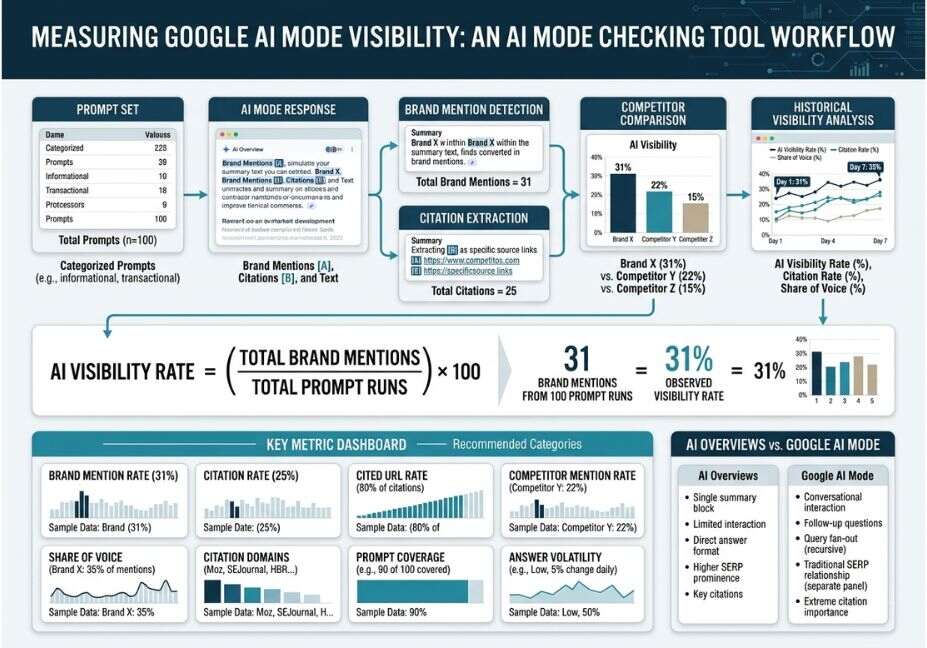
An AI Mode checking tool is software that runs test prompts against Google’s AI Mode search feature and records whether a brand gets mentioned, cited, or ignored. So, instead of tracking a position on a results page, it tracks presence inside a generated answer.
Most tools also poll ChatGPT, Gemini, and Perplexity, since all four rely on a similar fan-out-and-synthesize pattern. As a result, the output is typically a share of voice score, a citation-frequency count, and a list of competitor domains winning the same prompts.
Long-tail search this answers: “how to check if my site appears in Google AI Mode.”
How Does an AI Mode Checking Tool Work?
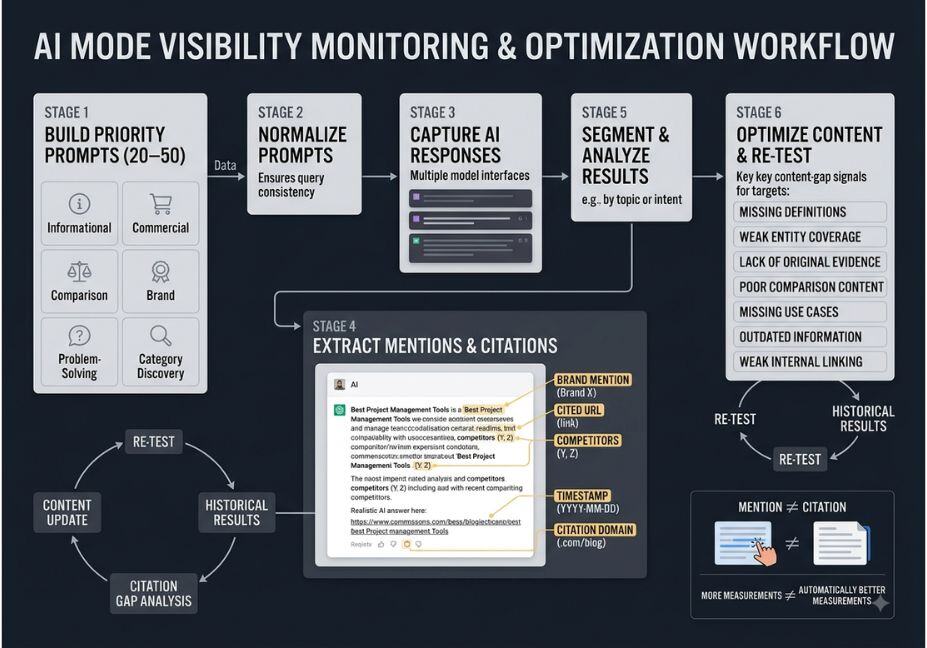
Under the hood, most tools follow the same four-stage loop:
- Prompt execution the tool submits real user queries to AI Mode.
- Response parsing it extracts the answer text and any cited source URLs.
- Entity matching it scans for brand names and domain citations, including unlinked mentions.
- Aggregation results roll up into visibility and share-of-voice trends over time.
Technical Note: Google’s fan-out process also applies pairwise ranking comparing candidate passages against each other rather than scoring each alone. Consequently, a page can win a sub-query it never explicitly targeted.
Did You Know? According to a SISTRIX analysis covering 10,000 keywords, Wikipedia was cited in roughly 12% of AI Mode answers well ahead of any single brand domain. In other words, reference-grade, well-structured content still wins citations.
AI Mode Checking Tool Use Cases 4 Real-World Examples
- Reputation monitoring: catching outdated or incorrect AI-generated facts about a company before a prospect repeats them to sales.
- Competitive benchmarking: seeing which competitor gets cited on category prompts your brand doesn’t win.
- Content gap discovery: finding prompts where nobody in your space gets cited yet.
- Agency reporting: exporting historical trends and competitor comparisons for client decks.
Pro Tip: Don’t only track exact brand-name prompts. Track the category prompts a buyer would actually type “best [category] for [use case]” since that’s where fan-out sub-queries live.
Best Tools and Approaches Compared
| Approach | Best For | Tradeoff |
|---|---|---|
| Dedicated AI Mode tracker (SaaS) | Teams needing automated reporting | Recurring, per-prompt cost |
| SEO suite with AI tracking bolted on | Teams with an existing rank-tracking budget | AI features are usually shallower |
| Self-hosted / open-source | Developers comfortable maintaining a pipeline | No support, needs your own API keys |
| Manual spot-checking | Small teams, occasional audits | Doesn’t scale; results vary by session |
Manual spot-checks are still worth doing now and then simply run your prompts directly in AI Mode and note whether your domain appears. However, results vary by prompt phrasing, location, and time, which is exactly why manual tracking breaks down at scale.
If budget or data control matters more than convenience, there’s a growing set of self-hosted, open-source AI visibility trackers a good fit as a free AI Mode checking tool option for small businesses not ready to pay for a SaaS platform.
Step-by-Step: How to Build a Minimal AI Mode Checker
You don’t need a commercial platform to get a first read on visibility. A short script that fires prompts at an LLM API and checks the response for your domain gets you most of the way there.
python
import requests

PROMPTS = [
    "best AI mode checking tool for SEO teams",
    "how to track brand visibility in google ai mode",
]

def check_mention(prompt, brand_terms):
    response = call_llm_api(prompt)  # your chosen model endpoint
    text = response["text"].lower()
    hit = any(term.lower() in text for term in brand_terms)
    return {"prompt": prompt, "mentioned": hit, "raw": text}

results = [check_mention(p, ["agentiveaiagents"]) for p in PROMPTS]
Swap call_llm_api for your chosen model, and consult LangChain’s own retrieval documentation if you want a retrieval step that mirrors how AI Mode gathers sources before generating an answer. This same script pattern also works well as a lightweight AI Mode tracker for SEO agencies running it across multiple client domains.
Technical Disclaimer: LLM APIs and retrieval behavior change frequently. This example reflects general patterns as of mid-2026 — always confirm current parameters against your provider’s official docs before running this at scale.
Common Mistakes and How to Avoid Them
- Testing only your brand name, instead of the category prompts real users type.
- Treating one run as ground truth track trends, not single snapshots.
- Ignoring unlinked mentions, which still count as visibility.
- Skipping location and device variables, since AI Mode answers can differ by region.
What Developers Are Saying
Builders in the open-source SEO tooling space have started shipping self-hosted alternatives, largely because commercial platforms lock reporting behind per-prompt pricing. Their argument: a basic tracking loop is simple enough to run yourself, with full control over the data.
Related Concepts (Topical Cluster)
To build topical authority, an AI Mode checking tool sits inside a broader concept cluster search engines and LLMs already recognize:
- AEO (Answer Engine Optimization) optimizing content to be selected as a direct answer.
- GEO (Generative Engine Optimization) the umbrella discipline this article and tool category belong to.
- RAG (Retrieval-Augmented Generation) the retrieval pattern powering AI Mode, ChatGPT, and Perplexity alike.
- Share of Voice the visibility metric these tools ultimately report.
FAQ People Also Ask
What is an AI Mode checking tool?
It’s software that submits test prompts to Google AI Mode, and often ChatGPT, Gemini, or Perplexity too, then reports whether your brand was mentioned, cited, or missing from the answer.
How is AI Mode different from AI Overviews?
AI Overviews add a short AI summary above normal search results, while AI Mode is a fully conversational experience that runs deeper query fan-out and supports follow-up questions.
Can I check AI Mode visibility manually, without a tool?
Yes for a quick check, just run your target prompts directly in AI Mode. That said, it doesn’t scale well, since results shift by phrasing, location, and session.
How often should I check my AI Mode rankings?
Weekly is usually enough for most brands, since AI Mode answers drift gradually as sources get re-crawled, rather than shifting like a paid ad auction.
Do AI Mode checking tools also cover ChatGPT and Perplexity?
Most dedicated tools do, because all major AI search products use a similar fan-out-and-synthesize pattern, so the same prompt-testing approach carries over.
“Hey Google, how do I know if my website shows up in AI Mode?”
You can ask AI Mode your target question directly and listen for whether it names your brand or site or, for ongoing tracking, use a dedicated AI Mode checking tool.
Conclusion
An AI Mode checking tool answers one question classic rank trackers can’t: does your brand actually show up inside the answer, not just beneath it. Because of query fan-out, visibility now depends on covering a full topic cluster, not one keyword.
Whether you adopt a dedicated tool, add AI tracking to an existing SEO suite, or script a minimal version yourself, the goal stays the same: know where you’re cited, where a competitor wins instead, and where nobody is cited at all.
Bookmark this guide and explore more hands-on AI agent tutorials at agentiveaiagents.com.